Unit 5 notes · 6 topics, read straight through
Unit 5: Securing Applications and Data
Every topic in one read: the big idea, the notes, the figures and the exam traps. Practice comes after, on the Unit 5 review.
5.1 Application and Data Vulnerabilities and Attacks
Big ideaEvery input box is a door. If the application does not check what comes through it, the adversary's text becomes the application's instructions.
1. How adversaries reach files (5.1.A)
| Weakness | What the adversary can do |
|---|---|
| Unencrypted files 5.1.A.1 | Read any of them, once they have access to the device or drive that stores them |
| Regular users with administrative privileges 5.1.A.2 | Administrative users control system settings and can typically access any file or application. Compromise one of these users and the adversary has elevated privileges on the system |
| Weak access control settings 5.1.A.3 | Many users can view, and sometimes edit, files. Adversaries use this to steal or destroy files or disrupt an application |
2. How application attacks exploit vulnerabilities (5.1.B)
An application is a program that runs instructions on a computer: it is executable data. Some run locally on the user’s computer; others, like web applications, run on a server and are reached over a network 5.1.B.1.
Many applications take user input in open-ended fields where users type letters, numbers and punctuation. Developers should check that input matches what is expected, for example only digits when the field asks for a number of items, and reject anything outside the expected parameters. Checking input before processing it is data validation. Applications that fail to validate input are vulnerable to injection-type attacks, where adversaries insert unexpected character strings to change how the program behaves 5.1.B.2.
SQL injection
Structured query language (SQL) requests information from databases and changes databases and their entries. An application that builds a database query from unvalidated or unsanitized user input is vulnerable 5.1.B.3. An SQL-injection attack places SQL commands and control characters into an input field. It can breach confidentiality (the application returns more information than it should) or integrity (data in the database are modified or deleted) 5.1.B.4.
input typed:  x' OR 1=1 --
query built:  SELECT * FROM members WHERE card = 'x' OR 1=1 --'
# the quote closes the text early, OR 1=1 is always true,
# and -- turns the rest into a comment: every member comes back
Cross site scripting (XSS)
Websites are written in hypertext markup language (HTML), and many use JavaScript for dynamic content. JavaScript runs in the visitor’s browser, so it can reach sensitive data stored there, such as usernames, passwords and cryptographic keys 5.1.B.5. A cross site scripting (XSS) attack injects malicious code into a website that the user’s browser then runs 5.1.B.6:
| Type | Where the code hides | Who is affected |
|---|---|---|
| Type I, reflected XSS | In a link the user clicks | The user who clicks it |
| Type II, stored XSS | Posted onto the site in a comment field, forum post or visitor log | Every user who visits the page |
Buffer overflow
When an application takes input, the input is written to a buffer: a set section of memory with a fixed size. Input larger than the buffer can overflow into the next memory locations and overwrite other parts of memory 5.1.B.7. A buffer overflow attack feeds in more data than was allotted. It can crash the system, or make it run code outside the program’s security policy, letting the adversary access, modify or delete files 5.1.B.8.
Directory traversal
The files that run a web application sit in directories on a server. Browsers request them with hypertext transfer protocol (HTTP) GET requests, and each GET request reaches a file somewhere in the server’s file system 5.1.B.9. In a directory traversal attack, adversaries edit URLs and GET requests to try to reach sensitive data, such as usernames and passwords, elsewhere on the server 5.1.B.10. Each ../ moves up one directory:
GET /recipes/photos/soup.jpg                     # expected
GET /recipes/photos/../../../backups/users.csv   # climbs 3 folders up, then into backups
3. Assessing and documenting data risks (5.1.C)
Data security risks hit confidentiality when unauthorized people can access sensitive data, integrity when data can be manipulated or altered, and availability when data can be destroyed or encrypted so others cannot reach them 5.1.C.1.
| Risk level | Typical pattern | Example (original) |
|---|---|---|
| High 5.1.C.2 | Highly sensitive data, often governed by laws or regulations, exposed to a highly likely exploit | A clinic’s patient records on a public file share with no password |
| Moderate 5.1.C.3 | Sensitive data without strong enough encryption or strict enough access controls | Student home addresses in a file encrypted with a short key |
| Low 5.1.C.4 | Less sensitive information with shorter keys or loose access controls | A club’s meeting minutes on a shared drive that every member can edit |
Now audit a file server the way an analyst would.
Exam traps
- Data validation checks that input matches what is expected, such as a number for a quantity, and rejects anything else. Failing to validate is the vulnerability; injection is the attack.
- Type I XSS is reflected (in a link the user clicks). Type II XSS is stored (posted onto the site, so it hits every visitor).
- In a URL, .. means one directory up. A run of ../ is the sign of directory traversal.
- SQL injection can breach confidentiality (returns more data than it should) or integrity (modifies or deletes data).
5.2 Protecting Applications and Data: Managerial Controls and Access Controls
Big ideaDecide who may do what to which data, write it down as policy, then enforce it: the fewest permissions that still let each person do the job.
1. Data state and classification (5.2.A)
Organizations apply specific security controls to comply with legal requirements, based on the types of data they collect, store, process and transmit 5.2.A.1. Data can be classified by their state 5.2.A.2:
| State | Where the data are | How to protect them |
|---|---|---|
| Data at rest | Stored on a drive | Protect the physical drive from destruction or theft; encrypt the data so a thief cannot immediately read them |
| Data in transit | Being sent from one device to another | Protect the physical media (such as cables); encrypt so an interceptor cannot immediately read them |
| Data in use | Being processed by software or a person | Access controls limit who or what can view or edit them. Data must be unencrypted to be used |
Organizations also categorize data by sensitivity and give more sensitive information a higher degree of security 5.2.A.3. Laws and regulations can require certain data to be stored, transmitted and handled by specific rules 5.2.A.4:
| Type | Includes (not limited to) | Protected by |
|---|---|---|
| Personally identifiable information (PII): any data that allow someone to be identified | Name, signature, phone number, address, biometric data such as fingerprints, social security number, date of birth, email address | The Privacy Act of 1974; for children under 13, the Children’s Online Privacy Protection Act (COPPA) of 1998 |
| Protected health information (PHI): data about an individual’s health, treatment or payment for healthcare at any time | Test results, treatment records, hospital records, doctor visit notes, health provider payment records | The Health Insurance Portability and Accountability Act (HIPAA) of 1996 |
| Payment card information (PCI): data collected to process card payments | Name, account number, expiration date, address, card verification value (CVV) code | The Payment Card Industry Data Security Standard (PCI-DSS) |
Organizations that collect regulated data label them and keep policies that meet the legal or regulatory rules for storing, transmitting and handling them 5.2.A.5.
2. Managerial controls for applications and data (5.2.B)
| Policy | May include |
|---|---|
| Cryptography policy: acceptable encryption protocols and key parameters 5.2.B.1 | Encryption algorithms approved for specific uses; minimum or maximum key lengths; key-generation requirements and parameters; key-storage requirements |
| Web application security policy: requirements for testing and fixing web application vulnerabilities 5.2.B.2 | When an application is subject to a security assessment; timelines for fixing vulnerabilities by level of risk; how an assessment is done (specific tools or frameworks) |
3. Access control models (5.2.C)
Access control enforces which users or applications (subjects) can access, modify, add or remove (operations) which files or applications (objects). An access control model describes how to decide which subjects get what access to which objects 5.2.C.1.
| Model | How access is decided |
|---|---|
| Role-based access control (RBAC) 5.2.C.2 | Every subject is assigned a role, and each role has set access to set objects |
| Rule-based access control (RuBAC) 5.2.C.3 | A set of rules is checked to allow or deny access, such as rules about the time of day, the location, or the network or device a request comes from; usually layered on top of another model |
| Discretionary access control (DAC) 5.2.C.4 | Subjects set the access other subjects have to objects they own. Administrators or super users can override them |
| Mandatory access control (MAC) 5.2.C.5 | Strict rules for what each subject level may do to objects above, at or below its level. An external administrator assigns the levels |
The Bell-LaPadula model is a MAC model often used by governments and militaries 5.2.C.6:
- Simple Security Property: subjects may not read objects above their level.
- * (Star) Security Property: subjects may not write to objects below their level.
Together: write up, read down (WURD). A Secret-level analyst can read Confidential reports and can write to a Top Secret file, but cannot read Top Secret or write to Confidential.
The principle of least privilege: give each entity exactly as much access as it needs to perform its function, and no more 5.2.C.7.
4. Linux permissions (5.2.D)
Authorization is when an entity is granted permission for a certain type of access to a resource; access controls decide which users have which types of access to which data 5.2.D.1.
Linux has three permissions, always in this order 5.2.D.2: read (view the contents), write (change the file) and execute (run a binary such as a program), shown as rwx. A - means the permission is absent, so read and execute only is r-x. They are set for three entities, always in this order, with no spaces 5.2.D.3: the file owner, the file group and all other users, as in rwxrwxrwx.
$ ls -l
-rw-r-----  1 records doctors 8204 Nov  9 08:02 patients.csv
-rwxr-xr--+ 1 itadmin it     512 Nov  9 08:05 sync.sh
#  owner group others  (+ means extra permissions: run getfacl sync.sh)
ls -l shows the settings; a + at the end means other permissions are set, viewable with getfacl 5.2.D.4. chmod changes them, with the numeric or the symbolic method 5.2.D.5.
Numeric method 5.2.D.6 chmod ### filename |
Symbolic method 5.2.D.7 chmod entity+permission filename |
|---|---|
| Digits in order: owner, group, others | Entities: u (user owner), g (group), o (others), a (all) |
| Add the values: 0 none, 1 execute, 2 write, 4 read | + adds and - removes a permission |
| 3 = write and execute, 5 = read and execute, 6 = read and write, 7 = all three | Permissions: r, w, x; entities and permissions can be combined |
chmod 640 patients.csv gives rw-r----- |
chmod go-r notes.txt removes read from group and others |
Practice choosing the model, then set real permissions with the drop-down menus.
Exam traps
- Permissions always come in the order read, write, execute, and the three sets always go owner, group, others.
- A + at the end of the ls -l permissions means extra permissions are set: view them with getfacl.
- Rule-based access control is usually layered on top of another model, such as RBAC.
- In MAC, an external administrator assigns the levels; in DAC, the object's owner decides.
5.3 Protecting Stored Data with Cryptography
Big ideaEncryption turns readable data into noise that only the right key can undo, so a stolen file is useless without the key.
1. How encryption protects files (5.3.A)
The purpose of cryptography is to hide information. A cryptographic algorithm defines how to encrypt (hide) and decrypt (reverse the encryption to get the original back) 5.3.A.1. An encryption algorithm combines the information with a predefined key. The input is the plaintext; the output is the ciphertext 5.3.A.2.
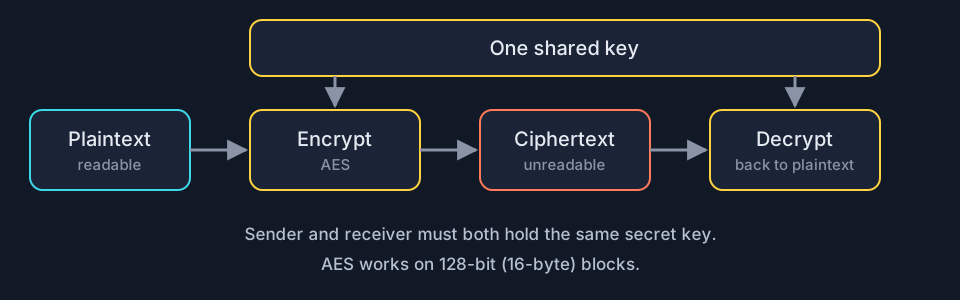
The number of possible keys an algorithm can use is the keyspace. The larger the keyspace, the longer it takes an adversary to find the correct key by random chance 5.3.A.3.
| Classified by | Types |
|---|---|
| Number of keys 5.3.A.4 | Symmetric: the same key encrypts and decrypts. Asymmetric: two different keys, one to encrypt and the other to decrypt |
| How data are processed 5.3.A.5 | Block encryption: fixed-size chunks called blocks, one output block per input block. Stream encryption: continuous input, output one element at a time |
2. Symmetric encryption with AES (5.3.B)
Computer-based encryption works on binary data. The most common symmetric algorithm is the Advanced Encryption Standard, used to secure Wi-Fi transmissions, internet browsing, file encryption on disks and hardware-level encryption on processors 5.3.B.1. AES is a symmetric key block cipher that encrypts data in 128-bit blocks (16 bytes). It can use keys of different lengths; longer keys are more secure but take more time to encrypt and decrypt 5.3.B.2.
You can encrypt and decrypt from the command line with OpenSSL, with specialized software such as the open source AES Crypt, or with web-based tools 5.3.B.3. In OpenSSL the key is derived from the password you provide 5.3.B.4:
# encrypt grades.csv with AES and a 256-bit key
$ openssl enc -aes-256-cbc -e -in grades.csv -k RiverStone93 -out grades.csv.enc
# decrypt: same cipher, -d, the same password
$ openssl enc -aes-256-cbc -d -in grades.csv.enc -k RiverStone93 -out grades.csv
Build the commands with the drop-down menus, then encrypt and decrypt your own message.
Exam traps
- Keyspace is the number of possible keys, not the key length. More bits in the key means a larger keyspace.
- In the OpenSSL commands, -e encrypts and -d decrypts; the key is derived from the password given after -k.
- AES is a symmetric block cipher: 128-bit (16-byte) blocks, same key both ways.
5.4 Asymmetric Cryptography
Big ideaAnyone can lock the box with your public key. Only your private key opens it, so the private key is the whole secret.
1. Which key to use (5.4.A)
Asymmetric encryption lets users communicate securely without prearranging a shared secret key 5.4.A.1. Every entity that will receive data first generates a key pair: two binary strings of equal length, generated at the same time by a mathematical process. One is the public key, the other the private key. The keys are mathematical inverses: either one can encrypt, but only the other key in the pair can decrypt 5.4.A.2.
The receiver must store the private key securely. If it is exposed, shared, stolen, corrupted or compromised, the key pair must be deleted and a new pair generated, because the security of the algorithm rests on the private key. The public key is published for anyone to view and use 5.4.A.3.
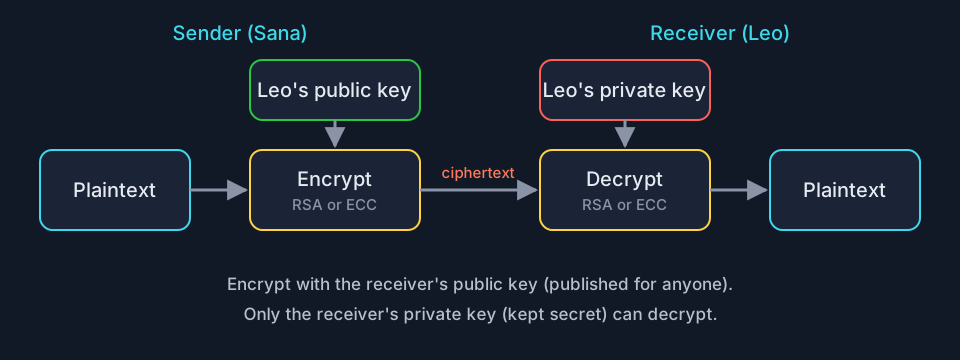
To send information securely, the sender encrypts with the receiver’s public key. Only the receiver, who has the private key, can decrypt and read it 5.4.A.4.
| You want to | Use |
|---|---|
| Send a confidential file to Leo | Leo’s public key |
| Read a confidential file sent to you | Your own private key |
| Let anyone send you confidential files | Publish your public key |
| Respond after your private key is stolen | Delete the key pair and generate a new one |
2. Why key length matters (5.4.B)
Longer keys give larger keyspaces. An n-bit key has a keyspace of 2n 5.4.B.1. Guessing randomly, an adversary finds the right key in 2n/2 = 2n-1 guesses on average 5.4.B.2.
| Key length | Keyspace | Average guesses |
|---|---|---|
| 8 bits | 28 = 256 | 27 = 128 |
| 9 bits | 29 = 512 | 28 = 256 |
| 16 bits | 216 = 65,536 | 215 = 32,768 |
Each extra bit doubles the keyspace. Longer keys are more secure but take more time to encrypt and decrypt 5.4.B.3. Computing power keeps improving, so key-length recommendations for symmetric and asymmetric algorithms are raised periodically 5.4.B.4. Key lengths can be compared only for the same algorithm: a longer AES key beats a shorter AES key, and a longer RSA key beats a shorter RSA key, but an RSA key and an AES key cannot be compared by length 5.4.B.5.
3. Applying asymmetric encryption (5.4.C)
Common asymmetric algorithms are RSA (named after its inventors, Rivest, Shamir and Adleman) and elliptic curve cryptography (ECC). They are used in many applications, including digital signatures and digital certificates 5.4.C.1. As with symmetric encryption, you can use the command line (OpenSSL), specialized software such as the open source RSA Encryption Tool, or web-based tools 5.4.C.2. With OpenSSL 5.4.C.3 (PEM, privacy-enhanced mail, is the text format the key files use):
| Step | Command |
|---|---|
| Generate a 2048-bit RSA key pair into rsa.pem | openssl genrsa -out rsa.pem 2048 |
| Extract the public key into public.pem | openssl rsa -pubout -in rsa.pem -outform PEM -out public.pem |
| Encrypt a file with the public key | openssl pkeyutl -encrypt -pubin -inkey public.pem -in memo.txt -out memo.enc |
| Decrypt with the private key | openssl pkeyutl -decrypt -inkey rsa.pem -in memo.enc -out memo.txt |
Pick the right key for each step with the drop-down menus, then run a real key pair in your browser.
Exam traps
- Either key in a pair can encrypt, but only the other key in that pair can decrypt.
- The two keys are binary strings of equal length, generated at the same time, and are mathematical inverses.
- Key-length recommendations go up over time because computers keep getting faster at guessing.
- openssl genrsa makes the key pair (rsa.pem holds the private key); openssl rsa -pubout extracts the public key.
5.5 Protecting Applications
Big ideaBuild security in from the first sketch and ship it switched on; then never trust what a user types.
1. Secure by design and secure by default (5.5.A)
Secure by design is an initiative that encourages companies to include security in all phases of product development, including design. Security becomes a design principle, not just a technical feature 5.5.A.1. It has three principles 5.5.A.2:
| Principle | What it looks like |
|---|---|
| Take ownership of customer security outcomes | Build products that meet customers’ security needs |
| Embrace radical transparency and accountability | Share security-related product news and updates quickly, which raises security for everyone |
| Build organizational structure and leadership | Leaders focused on security, with a security-first posture |
Secure by default is part of secure by design: security features of software and devices are enabled by default, so products are secure to use out of the box 5.5.A.3. A new smart speaker that forces you to set a unique password at first start, with automatic updates already switched on, is secure by default; one that ships with a shared factory password and updates turned off is not.
2. Input sanitization (5.5.B)
When users type into an application, it usually wraps the input in special characters to process it. These control characters include the single quote, the double quote and the semicolon 5.5.B.1.
expected:  ... WHERE city = 'Lisbon'
typed:     Lisbon'; DELETE FROM bookings; --
becomes:   ... WHERE city = 'Lisbon'; DELETE FROM bookings; --'
# the quote ends the text, the semicolon starts a new command
Programmers should use a verification function to check that input meets the expected criteria and contains no control characters that could manipulate the system. The function can sanitize the input by removing potentially malicious characters, or give the user an error and make them enter different input 5.5.B.2. For example, removing or encoding the < and > characters means a <script> tag can never form, and removing ../ stops a path from climbing directories. This protects against:
- SQL injection attacks
- Cross site scripting (XSS) attacks
- Directory traversal attacks
Review real form submissions below and decide which ones the verification function should stop.
Exam traps
- The three secure by design principles are about the company: ownership of customer security outcomes, radical transparency and accountability, and organizational structure and leadership.
- A verification function can either sanitize (remove dangerous characters) or reject the input with an error.
- Input sanitization protects against SQL injection, XSS and directory traversal attacks.
5.6 Detecting Attacks on Data and Applications
Big ideaData attacks leave fingerprints: the wrong file, the wrong time, a changed hash, or user input full of code. Know what each detector can and cannot see.
1. Detecting attacks on data (5.6.A)
Devices track and log when data are accessed and by whom. Recording and monitoring user activities is accounting. Analyzing these logs can reveal an adversary trying to access, copy, move or delete data 5.6.A.1. Suspicious activity includes:
- Accessing files that are not typically accessed
- Accessing files or applications outside a user’s normal patterns: time of day, location and device type
- Attempts to delete or copy sensitive files
A honeypot is a file that looks as if it holds valuable data (such as credit card information, personally identifiable information (PII) or passwords), but the data are fake. Because there is no legitimate reason to open it, any attempted access is an indicator of malicious activity, and the system can alert defenders 5.6.A.2. Cryptographic hash functions generate a digest for data and reveal if the data have been altered; an unexpected change can be a sign of malicious activity 5.6.A.3.
2. Choosing detective controls (5.6.B)
| Criterion | What it means |
|---|---|
| Cost 5.6.B.1 | Honeypots and hash checks are inexpensive. Third-party data loss prevention (DLP) services monitor data access, usage and transmission across the organization: strong detection at a higher cost |
| Sensitivity or criticality 5.6.B.2 | More sensitive or critical data and applications are likelier targets and should be monitored more closely |
| Classification 5.6.B.3 | Data classified as private, educational, healthcare or financial often have legal or regulatory detection and monitoring requirements |
3. Judging a detection method (5.6.C)
| Question | What to know |
|---|---|
| Speed 5.6.C.1 | Log analysis needs some automation to work at an effective speed. Honeypots detect almost instantly |
| During or after? 5.6.C.2 | Some DLP tools, honeypots and realtime automated log analysis alert as the attack happens, so defenders can stop it. Retrospective log analysis and hash checks identify attacks after they occur |
| What can it miss? 5.6.C.3 | False negatives: hashes detect only alteration, so data viewed or stolen without change go unnoticed; honeypots miss adversaries who never touch them |
4. Verifying a hash (5.6.D)
Hash functions are repeatable: the same input always gives the same output for a given function, so a change in the hash means a change in the file 5.6.D.1. Hashes can be calculated on the command line, on a website or with specialized software 5.6.D.2:
| Shell | Command for a Secure Hash Algorithm 256 (SHA-256) hash of a file named testfile |
|---|---|
| Windows PowerShell | Get-FileHash testfile -Algorithm SHA256 |
| bash | sha256sum testfile |
| zsh (common on Apple computers) | shasum -a 256 testfile |
Hash a file and record the output; hash it again later and compare. If the hash changed, the file was altered between the two hashes 5.6.D.3.
$ sha256sum policy.pdf          # March: recorded
5d41b0f2...3c9a  policy.pdf
$ sha256sum policy.pdf          # June: compare
a77e0913...e012  policy.pdf     # different: the file was altered
5. Reading application logs (5.6.E)
Each line of a web server log records the time, the source internet protocol (IP) address, the request and a status code. Read the user input inside each request.
| Attack | Indicators in application and server logs |
|---|---|
| SQL injection 5.6.E.1 | User input with a single or double quote; Boolean conditions such as OR 1=1; a double dash -- (a comment in SQL); SQL control words, always in capitals, such as WHERE, IN, FROM |
| XSS 5.6.E.2 | Suspicious tags in user input, especially <script>...</script> |
| Buffer overflow 5.6.E.3 | Long strings in the uniform resource locator (URL), cookie, query string or total request length |
| Directory traversal 5.6.E.4 | Hypertext transfer protocol (HTTP) GET requests whose paths contain sequences of ../ |
Work the logs below the way a security operations analyst would.
Exam traps
- Honeypots and hash checks are inexpensive; DLP services detect strongly but cost more.
- More sensitive or critical data should be monitored more closely; private, educational, healthcare and financial data often have legal monitoring requirements.
- Log analysis needs some automation to work at an effective speed.
- A changed hash means the file was altered between the two hashes; a matching hash means it was not altered (not that it was not read).
Notes done
Now practice the whole unit
Mixed questions from every topic work better for memory than one topic at a time. Recall the lists first, then answer exam-style questions and a free response.