Unit 3 notes · 5 topics, read straight through
Unit 3: Securing Networks
Every topic in one read: the big idea, the notes, the figures and the exam traps. Practice comes after, on the Unit 3 review.
3.1 Network Vulnerabilities and Attacks
Big ideaNetworks trust what devices tell them. Each attack in 3.1 feeds the network a lie: a fake address, a flood of fake addresses, a fake record or a fake sender.
New to switches, MAC addresses or DNS? Do the Unit 3 Primer: Networking Basics first. This topic assumes it.
1. Four common network attacks (3.1.A)
| Attack | What the adversary does | What it is an example of |
|---|---|---|
| ARP poisoning | sends falsified ARP packets so the default gateway pairs the target’s internet protocol (IP) address with the adversary’s MAC address | an on-path attack, using MAC spoofing |
| MAC flooding | sends a switch a flood of Ethernet frames, each with a different MAC address | eavesdropping (sniffing) |
| DNS poisoning | poses as an authoritative name server and plants a fake DNS record | credential harvesting |
| Smurf attack | sends many Internet Control Message Protocol (ICMP) requests, carrying the victim’s address, to a network’s broadcast address | denial of service (DoS) |
ARP poisoning: getting on the path 3.1.A.1
The default gateway uses ARP to build a table that pairs IP addresses with MAC addresses. In ARP poisoning, the adversary sends the gateway falsified ARP packets so that the target’s IP address is linked to the adversary’s MAC address. Traffic meant for the target now reaches the adversary first. Often the adversary poisons both sides, the gateway and the target, so traffic in both directions passes through it. Faking a MAC address like this is MAC spoofing.
This makes ARP poisoning an on-path attack, also called a man-in-the-middle attack. The adversary sits in the data stream between two parties, captures what each sends, and may copy or alter it before passing it on. Both parties believe they are talking directly to each other. Run the ARP poisoning simulator to see the gateway’s table change.
MAC flooding: making a switch broadcast 3.1.A.2
A switch normally sends each frame only to the port where the destination MAC address lives. In MAC flooding, the adversary sends the switch many Ethernet frames, each with a different MAC address. This can force the switch into broadcast mode, so it sends frames out of every port, and the adversary collects frames meant for other devices. Capturing data in transit to record and copy it is eavesdropping, also called sniffing. Try it in the simulator below.
Real view
switch# show mac address-table
Vlan  Mac Address       Type      Ports
  1   3c52.824a.9f10    DYNAMIC   Fa0/1
  1   5a01.9c44.7b21    DYNAMIC   Fa0/2
  1   02a1.77c3.0e91    DYNAMIC   Fa0/4
  1   9ef0.12bb.4c07    DYNAMIC   Fa0/4
  1   36d2.e8a1.55f3    DYNAMIC   Fa0/4
  1   c4a8.0b9e.71d2    DYNAMIC   Fa0/4
... thousands more on Fa0/4 ...DNS poisoning: sending users to a fake site 3.1.A.3
In DNS poisoning, the adversary pretends to be an authoritative name server (NS) and plants a fake DNS record on a DNS server. Browsers that ask that server are redirected to a malicious website built to look like the real login page. Users type their real usernames and passwords, and the adversary captures them. Setting up a fake login site to collect real credentials is credential harvesting.
Smurf attacks: turning a network against a victim 3.1.A.4
A smurf attack tries to overwhelm a network with ICMP requests. The adversary sends many requests with the victim’s address as the source to the network’s broadcast address. The gateway passes each request to every device on the network, and every device replies to the victim. The flood of replies can block legitimate messages.
- A denial of service (DoS) attack makes a system or resource unavailable to authorized users. A smurf attack is one kind.
- When many devices attack the same target at the same time, it is a distributed denial of service (DDoS) attack.
2. How adversaries exploit network weaknesses (3.1.B)

- No firewall, or a badly configured one 3.1.B.1. Malicious traffic sent in from outside can flood the network (a DoS), map how it is laid out inside, or impersonate (spoof) a legitimate device.
- One compromised device 3.1.B.2. Once adversaries control one device, they often use that access to compromise other devices on the same local area network (LAN). This is lateral movement.
- An open data port 3.1.B.3. A wall data port leads straight to a switch port. Unless the switch limits which devices each port accepts (port security), anyone who plugs in is on the LAN, ready to launch DoS, MAC flooding or MAC spoofing attacks.
- A signal that leaves the building 3.1.B.4. Standing outside a secure space, an adversary can pick up the wireless access point’s signal and beacon frames, learn about the wireless network, and attempt eavesdropping and cryptographic attacks.
- A network that does not check who joins 3.1.B.5. Adversaries try to join a network so they can launch attacks from inside it. If the network never asks a device or user to prove who they are, joining is easy.
- A rogue access point 3.1.B.6. An adversary plugs a wireless access point into an open network port. The rogue access point gives wireless access to the LAN, possibly from outside the building, and bypasses the firewalls at the network boundary. How far it reaches depends on the network design: port security, device authentication and internal segmentation can stop or limit it.
- Wireless encryption that can be broken 3.1.B.7. Adversaries can try to break wireless encryption, then intercept, steal or compromise data on the network. Topic 3.2 covers strong encryption.
3. Assessing and documenting network risks (3.1.C)
What is at stake 3.1.C.1. Network vulnerabilities can let adversaries intercept and alter data in transit, launch DoS attacks, or move laterally to more sensitive or critical systems. Each of these threatens confidentiality, integrity or availability.
| What the adversary can do | Main goal of security put at risk |
|---|---|
| intercept data in transit | confidentiality |
| alter data in transit | integrity |
| launch a DoS attack | availability |
| move laterally to critical systems | any of the three, depending on what those systems hold |
Finding vulnerabilities 3.1.C.2. Automated vulnerability scanners check networks, devices and applications for known vulnerabilities. Their reports usually list each vulnerability found, its severity, and how to mitigate it.
Likelihood 3.1.C.3. Exploiting many network vulnerabilities takes advanced technical ability and knowledge. The harder an exploit is, the lower its likelihood.
Rating the risk 3.1.C.4 to 3.1.C.6
| Rating | What it means | Example (original) |
|---|---|---|
| High | an adversary can easily cause significant harm: capture traffic, spoof a legitimate device, or launch a DoS attack | a public library lobby has live data ports with no port security, so anyone can plug in, capture traffic or pose as a staff computer |
| Moderate | an adversary could gain information about the systems or devices on the network | the network answers unauthenticated scans with a list of device names and operating system versions |
| Low | hard to exploit, and likely to have little negative impact | a printer’s settings page, reachable only from a locked server room, runs an old version with a flaw that needs rare expertise to use |
| Low (CED example) | hard to exploit, and likely to have little negative impact | access points broadcast beacon frames that show the network name (service set identifier, SSID) and its encryption protocol |
CED examples: high, a single unsegmented internal network reachable through Wi-Fi with weak encryption, with a server running the organization’s web application on it; moderate, an external firewall not configured to block ICMP traffic from outside.
When you document a risk, state the vulnerability, how likely it is to be exploited (and why), what the impact would be, and the rating that follows.
Where this shows up next
- Protecting networks with policies and wireless security: topic 3.2.
- Segmentation, which limits lateral movement: topic 3.3.
- Firewalls at every point of ingress and egress: topic 3.4.
- Detecting each attack in this topic: topic 3.5.
Exam traps
- MAC flooding is eavesdropping, not denial of service: the switch keeps working but sends frames out of every port.
- In a smurf attack the victim's address is forged as the source; the network's own devices do the flooding.
- A devastating vulnerability that needs rare skill to exploit is lower risk than it looks. Risk needs both likelihood and impact.
3.2 Protecting Networks: Managerial Controls and Wireless Security
Big ideaPolicies decide what every network device must look like; configuration makes it true.
New to beacon frames and access points? The Wireless basics lesson in the Unit 3 Primer covers them.
1. Network security policies (3.2.A)
Policies are managerial controls: they set the minimum standard every device must meet.
| Policy | Typical requirements |
|---|---|
| Router security policy 3.2.A.1 | Ban local user accounts (logins go through an approved authentication server). Disable unnecessary services, such as Telnet. Require a firewall, which may be a separate device. |
| Switch security policy 3.2.A.2 | Ban local user accounts. Require port security. Use MAC filtering. |
| Virtual private network (VPN) policy 3.2.A.3 | List the roles allowed to use the VPN. Set authentication requirements, such as a public and private key system or multifactor authentication (MFA). Prohibit split tunneling (also called dual tunneling). |
| Wireless security policy 3.2.A.4 | Users authenticate through the extensible authentication protocol (EAP) to an approved server. All wireless traffic is encrypted with the Advanced Encryption Standard (AES) at a minimum key length. Beacon frames are disabled on access points. |
Why ban local accounts? A local account lives only on that one device, so it escapes central control: nobody reviews it, and it often keeps a weak or default password. An approved authentication server keeps every login in one managed place.
2. Configuring wireless security (3.2.B)
- Disable beacon frame broadcasting on wireless access points (WAPs), so adversaries have a harder time finding the network and learning its basic properties 3.2.B.1. In real equipment this usually means the access point still beacons but leaves the network name blank (“hidden service set identifier (SSID)”) while still showing its MAC address, channel and security type, so it hides the network from casual view, not from a determined adversary.
- Control broadcast direction and signal strength, so the signal does not reach beyond the space the access point should cover 3.2.B.2.
- Enable strong encryption, so intercepted wireless frames cannot be read 3.2.B.3:
| Protocol | Status |
|---|---|
| WEP (Wired Equivalent Privacy) | Insecure: known vulnerabilities |
| WPS (Wi-Fi Protected Setup) | Insecure: known vulnerabilities |
| WPA (original Wi-Fi Protected Access) | Insecure: known vulnerabilities |
| WPA3 | Currently the strongest |
- Enable MAC filtering to keep unauthorized devices off the network, and require users to authenticate when they join 3.2.B.4.
Prevent: each setting answers an attack from 1.3 or 3.1. MAC filtering and authentication keep unauthorized devices off, WPA3 counters eavesdropping on wireless frames, and limiting the signal counters war driving from outside (driving or walking around a site to detect its wireless signals; see 1.3).
Now audit a real-looking router configuration against the policy.
Exam traps
- A policy is a managerial control even when it is about routers. The settings it requires are technical controls.
- WEP, WPS and the original WPA are all insecure. Only WPA3 is named the strongest.
- Banning split tunneling is part of a VPN policy, not a wireless policy.
3.3 Protecting Networks: Segmentation
Big ideaSegmentation does not stop the first compromise. It stops the spread.
1. Ways to segment a network (3.3.A)
| Technique | How it works |
|---|---|
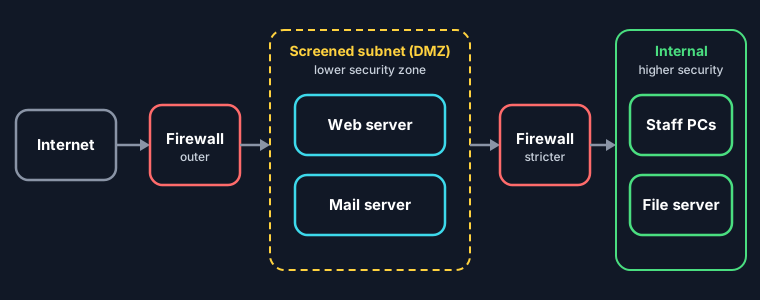
| Screened subnet (also called a demilitarized zone, or DMZ) 3.3.A.1 | Firewall zones and rules create a segment between the public internet and the internal private network. It is usually a lower security zone and holds public-facing resources, such as the website, keeping them apart from the internal network. |
| Subnetting 3.3.A.2 | Creates separate subnets based on IP addressing. If an adversary compromises one device, the subnet boundary contains the breach and fewer devices are exposed. |
| Virtual local area networks (VLANs) 3.3.A.3 | Switches logically separate devices that are physically connected to the same central switches. |
Case file: Northgate High
The school’s network is split into four segments: a screened subnet for the public website, a staff subnet with grade records, a student VLAN for classroom laptops, and a VLAN for security cameras. When a student laptop catches malware, its traffic stays on the student VLAN, and firewall rules keep it away from the staff subnet and the cameras.
2. Why segmentation increases security (3.3.B)
- Network segmentation means dividing a network into smaller, isolated segments, or subnets 3.3.B.1.
- Isolating traffic means an attack on one subnet can be kept from affecting devices on other subnets 3.3.B.2.
- Each segment can get its own security policies and controls, creating higher and lower security zones 3.3.B.3.
- On switches, port security limits how many MAC addresses any single port can have, which prevents MAC flooding 3.3.B.4. Try that in the MAC flooding simulator in 3.1.
Prevent: put the most valuable data in the smallest, most tightly controlled segment.
Exam traps
- The screened subnet (DMZ) is a lower security zone than the internal network, not a higher one.
- Port security prevents MAC flooding; a VLAN separates devices logically on the same switches.
3.4 Protecting Networks: Firewalls
Big ideaA firewall reads its rules from the top and stops at the first match. Order is security.
1. Types of network firewalls (3.4.A)
A firewall allows or denies network traffic coming into or leaving a network. It is software, which can run on a standalone device or be built into another network device such as a router 3.4.A.1.
| Type | What it filters on |
|---|---|
| Stateless firewall 3.4.A.2 | Information in each packet’s header: internet protocol (IP) addresses, ports and protocols |
| Stateful firewall (also called dynamic packet filtering) 3.4.A.3 | Everything a stateless firewall checks, plus the state of connections passing through (for example, it lets in a reply only if a device inside started that connection), which gives more control over what is allowed in and out |
| Next-generation firewall (NGFW) 3.4.A.4 | Stateless and stateful filtering, plus advanced features such as intrusion prevention, deep packet inspection and filtering by application type |
2. Access control lists (3.4.B)
Network administrators write a set of rules called an access control list (ACL). The firewall uses it to permit or deny inbound and outbound traffic 3.4.B.1.
-
Rules are checked in order. The first rule that matches is executed 3.4.B.2.
-
A typical rule states the direction (inbound or outbound), the criterion (IP address, logical port, service or application) and the action (permit or deny) 3.4.B.3.
How to read it: TCP is the transmission control protocol. Port 443 carries Hypertext Transfer Protocol Secure (HTTPS) web traffic. Port 3389 carries remote desktop connections. A range such as 198.51.100.0/24 means every address from 198.51.100.0 to 198.51.100.255.
# read top to bottom, first match wins
1  DENY   inbound  TCP 443  from 198.51.100.0/24   # known bad range
2  ALLOW  inbound  TCP 443  from ALL                # HTTPS for everyone else
3  ALLOW  inbound  TCP 3389 from 10.0.5.0/24       # remote desktop, admin subnet only
4  DENY   inbound  ALL      from ALL                # default deny
3. Where firewalls go (3.4.C)
- Each network segment should have a firewall controlling the flow of data in and out of it 3.4.C.1.
- Segments have different security needs, so each firewall’s security level is set independently 3.4.C.2.
- Every point of data ingress and egress between the internal network and the public internet needs a firewall 3.4.C.3.
This is why the screened subnet in topic 3.3 sits between two firewalls: a looser one facing the internet and a stricter one facing the internal network.
4. Writing firewall rules (3.4.D)
- Start from the requirements: which types of traffic, from which sources or to which destinations, should be allowed or denied 3.4.D.1.
- Rules can allow or deny inbound or outbound traffic by source or destination port or IP address, service, protocol or application 3.4.D.2.
- Order changes the result. Changing the order of the same rules can change which traffic gets through, so think about precedence: specific rules usually go before broad ones 3.4.D.3.
In the ACL above, swap rules 1 and 2 and the “known bad range” gets in: rule 2 allows all port 443 traffic first, and rule 1 is never reached. Test that in the simulator.
Exam traps
- If a specific deny rule sits below a broad allow rule, the deny rule is never reached.
- A firewall is software; it can be built into a router.
- An NGFW adds intrusion prevention, deep packet inspection and application filtering on top of stateless and stateful filtering.
3.5 Detecting Network Attacks
Big ideaNo single detection method wins: choose by traffic volume, consistency, sensitivity and the chance of new attacks.
1. Automated detection tools (3.5.A)
Detection tools analyze data collected from switches, routers, servers, firewalls and user computers, usually stored in log files 3.5.A.1.
| Tool | What it does |
|---|---|
| Network intrusion detection system (NIDS) 3.5.A.2 | Analyzes data to decide whether malicious activity is happening on the network, and generates an alert |
| Network intrusion prevention system (NIPS) 3.5.A.3 | Detects like an intrusion detection system (IDS), and can also mitigate or halt the attack by closing ports, blocking specific internet protocol (IP) or media access control (MAC) addresses, or rejecting specific protocols |
| Security information and event management (SIEM) 3.5.A.4 | Collects and analyzes data from many sources (firewalls, NIDS and NIPS, device logs, application logs) to find patterns of an attack, then raises an alert. Analysts investigate whether it is a true threat and follow standard operating procedures to resolve or escalate it |
2. AI in threat detection (3.5.B)
- Computers log every user action, and firewalls, IDSs, intrusion prevention systems (IPSs) and other sensors log all traffic. A medium-sized organization logs millions, even tens of millions, of data points a day: far too many for any human team 3.5.B.1.
- Threat detection teams build AI algorithms that analyze this data and classify patterns as malicious or normal 3.5.B.2.
- The models are probabilistic: they report a percentage for how likely something is malicious 3.5.B.3.
- Each organization sets its own alert threshold 3.5.B.4:
| Threshold | Result |
|---|---|
| Too high | Real attacks may go undetected |
| Too low | The team is overwhelmed with false alerts |
3. Choosing a detection method (3.5.C)
| Network trait | Best fit | Why |
|---|---|---|
| High traffic volume 3.5.C.1 | Signature-based | Compares data to a database of known indicators of compromise (IoCs), called signatures. Runs faster than anomaly-based. The database must be kept updated. |
| Consistent traffic patterns 3.5.C.2 | Anomaly-based | Compares data to a baseline recorded on uncompromised systems, and alerts when data types or volumes fall outside a tolerance range. Needs consistent patterns to work. |
| Sensitive or critical data or services 3.5.C.3 | Hybrid | Combines both. More expensive than either alone and generates more alerts. |
| Novel attacks likely 3.5.C.4 | Anomaly-based (if hybrid costs too much) | Signature-based detection cannot detect a new attack. |
4. Evaluating a detection method (3.5.D)
| Factor | Signature-based | Anomaly-based | Hybrid |
|---|---|---|---|
| Speed 3.5.D.1 | Faster, especially on high-traffic networks | Slower | Not stated in the CED; it runs both methods |
| Cost 3.5.D.2 | Cheaper hardware | Needs more expensive hardware | Most expensive |
| False positives 3.5.D.3 | Almost none | Higher | Higher |
| False negatives 3.5.D.4 | Easier to bypass | Harder to bypass | Harder to bypass |
- Faster detection means faster response 3.5.D.1. Tools and running costs must fit the budget 3.5.D.2.
- A high false positive rate wastes time and resources on harmless activity and causes alert fatigue, when responders assume alerts are false before investigating 3.5.D.3.
- A false negative is when an adversary gets past the detection system, which can lead to loss, harm, disruption or destruction of data and systems 3.5.D.4.
5. Indicators of each network attack (3.5.E)
| Attack | How to detect it |
|---|---|
| Evil twin 3.5.E.1 (an adversary’s access point that copies or imitates a real network name; see 1.3) | Regularly scan for service set identifiers (SSIDs) that look suspicious or similar to legitimate local ones. Use signal triangulation to locate and disable the access point. |
| Jamming 3.5.E.2 (flooding the wireless frequencies with a strong signal so devices cannot communicate) | No wireless device in an area can connect, and scanning finds electromagnetic (EM) noise in the wireless range. |
| ARP poisoning 3.5.E.3 | Unusual address resolution protocol (ARP) messages, especially ARP packets with duplicate MAC addresses, and a check of the ARP table on the default gateway. In a poisoned table, one MAC address appears beside two different IP addresses: the target’s and, most likely, the adversary’s own. It is a warning sign to confirm (for example, by finding which switch port uses that MAC address), not proof. |
| MAC flooding 3.5.E.4 | An unexpected surge of Ethernet frames with different MAC addresses, and a check of the switch’s MAC address table. |
| DNS poisoning 3.5.E.5 | Hard to detect. An abrupt, otherwise unexplained drop in website traffic is a reason to examine domain name system (DNS) records. |
| Smurf attack 3.5.E.6 | A sudden increase in internet control message protocol (ICMP) requests sent to the network’s broadcast address. |
Network-based IoCs are found by analyzing traffic, often in packet capture files, looking at source and destination IP addresses, ports and protocols 3.5.E.7:
- connections to known malicious IP addresses
- unauthorized network scans
- unusual spikes or slowdowns in traffic
- mismatched port and application traffic, such as web traffic on a port meant for something else
The primer and 3.1 simulators already let you play defender for ARP poisoning, MAC flooding and DNS poisoning. Below, hunt for IoCs in a network log.
Exam traps
- A NIDS alerts; a NIPS can also block. In Unit 2 terms, an IPS is corrective.
- Signature-based detection cannot detect a new attack, however fast it is.
- An alert threshold set too high misses real attacks; set too low, it causes alert fatigue.
- DNS poisoning is hard to detect: look for a sudden, unexplained drop in website traffic.
Notes done
Now practice the whole unit
Mixed questions from every topic work better for memory than one topic at a time. Recall the lists first, then answer exam-style questions and a free response.