Unit 3 Primer notes · 3 sessions, about 65 minutes, read straight through
Networking Basics
Everything Unit 3 assumes you know, in one read: the notes, the figures, the common mix-ups and a 30-second recap per session. Then check yourself with the readiness check.
Session 1 Networks: hosts, packets and the devices that move them
A network is a set of devices, called hosts, connected so they can exchange data. Data crosses a network in small packets, each wrapped in a frame for one link. Switches join hosts inside a local area network (LAN), routers join networks, and firewalls control the traffic that crosses the boundary.
What a network is
A network is a set of devices connected so that they can exchange data. Unit 3 talks about networks at three scales:
| Scale | What it covers | Who controls it |
|---|---|---|
| Local area network (LAN) | one home, classroom, office or building | one organization or household |
| Wide area network (WAN) | links between sites that are far apart, such as offices in two cities | one organization, over links leased from providers |
| The internet | millions of networks worldwide | nobody: networks agree to exchange traffic |
The company that connects an organization to the internet is its internet service provider (ISP).
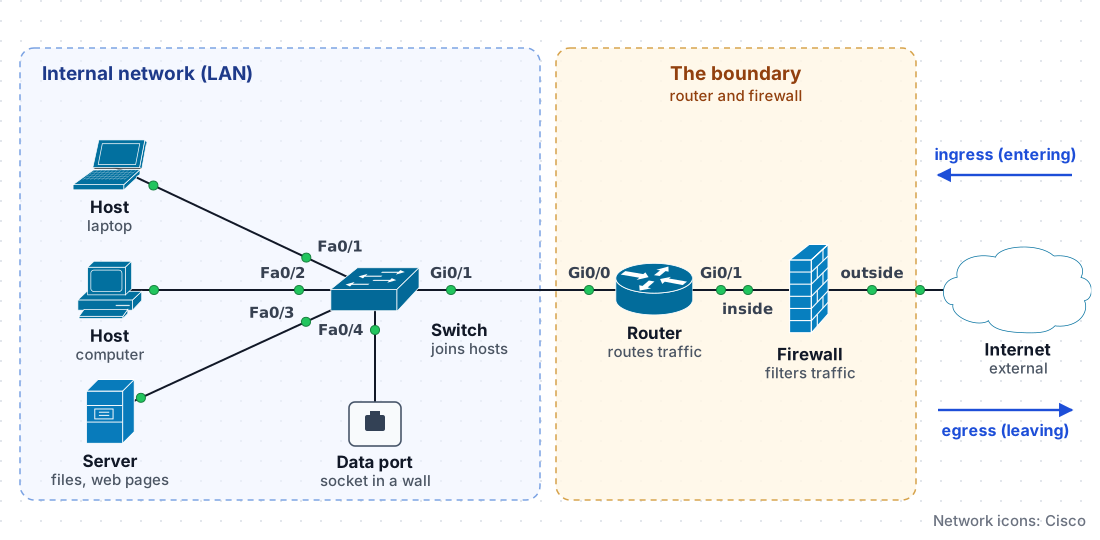
How to read this diagram
Fa0/1toFa0/4- Switch ports. Fa is FastEthernet (100 Mbps); 0 is the slot, the last number is the port. Fa0/4 runs to the wall data port: the side door an adversary can plug into.
Gi0/0,Gi0/1- GigabitEthernet ports (1 Gbps): the faster links between the switch and the router.
inside,outside- Firewall interfaces named by where they face: inside to the trusted LAN, outside to the internet.
- Green dots
- Link lights: the cable is connected and working at both ends.
- Dashed zones
- The LAN the organization trusts, and the boundary where the router and firewall meet the internet.
On the exam: hosts, servers, data ports, the boundary, ingress and egress. Port names such as Fa0/1 are how real devices label ports; you will not be asked about them.
Hosts, servers and network data ports
- A host is any device that sends or receives data on a network: laptops, phones, printers and smart devices. Each host connects through a network interface card (NIC), by cable or by radio.
- A server is a host that provides a service to other hosts, such as storing files, publishing web pages or answering name lookups. A server is a device, not a kind of network.
- A network data port is a socket in a wall that is cabled to a port on a switch. Plugging a device into it connects that device to the LAN.
Think of a school: the hosts are the students and staff, the server is the library that waits for requests, and a data port is a side door into the building.
That side door is why Unit 3 cares about data ports. An adversary who plugs a laptop into an unused data port joins the LAN through the switch port, unless port security is enabled 3.1.B.3. One compromised host on the LAN can then be used to reach other devices on it 3.1.B.2.
Two meanings of “port.” A physical port is a socket that a cable plugs into, such as a data port or a switch port. A logical port is a number that identifies a service on a host, such as port 443 for secure web pages. Unit 3 uses both, so read the context.
The internal network and its boundary
The network an organization owns and controls is its internal network. Any network outside it, such as the internet, is an external network. At the boundary, a router and a firewall control the traffic. Traffic entering the internal network is ingress; traffic leaving it is egress. Unit 3 expects a firewall at every point of ingress and egress, so an organization with two internet connections needs a firewall on each 3.4.C.3.
Data travels as packets
Data does not cross a network in one piece. A message is divided into small units called packets. Each packet travels separately, possibly by a different route, and the receiver puts the message back together in order. A lost packet can be sent again without resending everything.
A packet analyzer records the packets that cross a link. Below, it shows one web request: the laptop and the web server first open a connection with the transmission control protocol (TCP), then they agree on keys and the request travels encrypted with Transport Layer Security (TLS), the encryption behind secure web pages (hypertext transfer protocol secure, HTTPS).
Real view
| No. | Source | Destination | Protocol | Length | Info |
|---|---|---|---|---|---|
| 1 | 192.168.1.10 | 198.51.100.20 | TCP | 66 | 51544 → 443 [SYN] |
| 2 | 198.51.100.20 | 192.168.1.10 | TCP | 66 | 443 → 51544 [SYN, ACK] |
| 3 | 192.168.1.10 | 198.51.100.20 | TCP | 54 | 51544 → 443 [ACK] |
| 4 | 192.168.1.10 | 198.51.100.20 | TLS | 571 | Client Hello |
| 5 | 198.51.100.20 | 192.168.1.10 | TLS | 1514 | Server Hello, Certificate |
| 10 | 192.168.1.10 | 198.51.100.20 | TLS | 540 | Application Data |
Ethernet II, Src: 3c:52:82:4a:9f:10, Dst: 00:1a:2b:3c:4d:5e Frame header
Internet Protocol Version 4, Src: 192.168.1.10, Dst: 198.51.100.20 IP header
Transmission Control Protocol, Src Port: 51544, Dst Port: 443 TCP header
Payload: 486 bytes Payload
How to read this capture
- Packet list
- One row per packet. A filter shows one connection: packets 1 to 3 open the TCP connection, packets 4 to 9 are the TLS handshake that agrees on encryption keys (6 to 9 are hidden here), and packet 10 carries the encrypted request. Length is the whole frame in bytes: 14 + 20 + 20 + 486 = 540.
- Layers
- Selecting a packet opens it layer by layer, outside in: the frame header (MAC addresses for this link), the IP header (where the packet is going), the TCP header (which service), then the payload.
- TLS
- Transport Layer Security, the encryption that HTTPS uses. That is why the payload is unreadable while every header above it can still be read.
On the exam: that headers carry addresses, ports and the protocol, that a firewall filters on them, and that an encrypted payload stays unreadable to an eavesdropper. The capture layout and field names are not tested.
- Header. Each packet begins with a header: the addressing and control information that network devices read. The internet protocol (IP) header holds the source and destination IP addresses and the protocol. After it comes a transmission control protocol (TCP) or user datagram protocol (UDP) header, which holds the source and destination ports; TCP also numbers the pieces so they can be put back in order and resends lost ones, while UDP sends without confirming delivery, which is faster.
- Payload. The rest of the packet is the payload, the piece of data being carried. If the connection is encrypted with HTTPS (hypertext transfer protocol secure), the payload is unreadable to anyone who captures it, but the headers stay readable.
- Frame. To cross each local link, the packet is wrapped in a frame, whose header holds the media access control (MAC) addresses of the two devices on that link. A frame on a cabled LAN is an Ethernet frame; Wi-Fi uses its own frames. Every router removes the old frame and builds a new one for the next link, while the packet inside is carried end to end.
Ports name the service. The destination port tells the receiving device which service the traffic is for. Firewall rules and logs refer to these numbers constantly.
| Port | Protocol | Service |
|---|---|---|
| 22 | TCP | Secure shell (SSH): encrypted remote login |
| 23 | TCP | Telnet: unencrypted remote login |
| 53 | UDP and TCP | Domain name system (DNS) lookups |
| 80 | TCP | Hypertext transfer protocol (HTTP): unencrypted web |
| 443 | TCP | HTTPS: encrypted web |
Traffic entering a network is inbound (ingress); traffic leaving it is outbound (egress).
Why firewalls care. A stateless firewall filters on header fields: IP addresses, ports and protocols 3.4.A.2. A next-generation firewall can also inspect the payload, which is called deep packet inspection 3.4.A.4; an encrypted payload has to be decrypted before it can be inspected.
Data in transit. Data moving across a network is data in transit; data stored on a drive is data at rest. Data in transit can be captured on any link it crosses. Capturing it to read, record or copy it is eavesdropping, also called sniffing 3.1.A.2, 3.1.C.1. A recording of the packets passing a point is a packet capture, which analysts read header by header.
The devices that move traffic
Four kinds of device carry traffic in and out of a typical LAN.
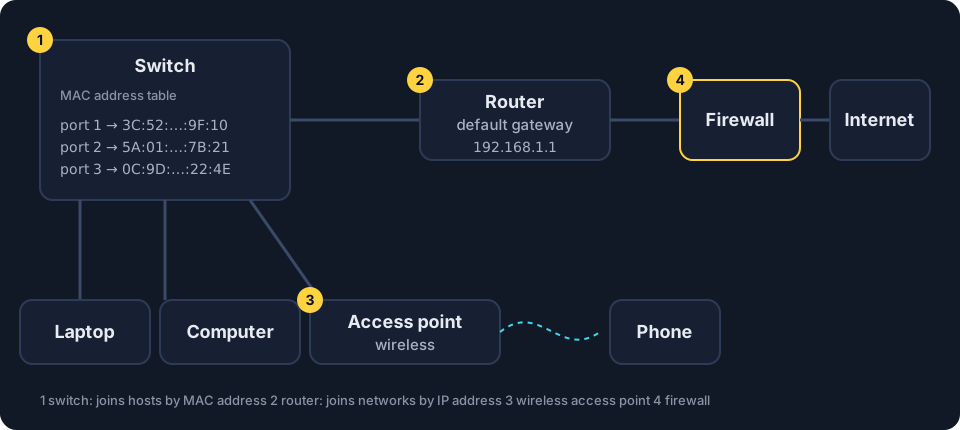
How to read this diagram
show mac address-table- The command that prints a Cisco switch's MAC address table: which MAC address was last seen on which port.
3c52.824a.9f10- A MAC address the way Cisco writes it, in three groups of four: the same as 3C:52:82:4A:9F:10.
Fa0/1- The switch port the device is plugged into (FastEthernet slot 0, port 1).
Vlan 1- The virtual local area network the port belongs to; 1 is the default. You can ignore it here.
On the exam: how a switch, a router (the default gateway) and a firewall differ, and that a switch forwards frames by MAC address. The command, the address format and port names are not tested.
- Switch. Joins hosts within a LAN. It learns which MAC address is connected to which of its ports and stores the pairs in its MAC address table. It then sends each frame only to the port where the destination MAC address was seen. If the destination is not in the table, it sends the frame out of every port.
- Router. Joins networks and forwards packets between them by reading IP addresses. The router’s address on a LAN is the default gateway. A host compares the destination’s network portion with its own: if they match, it delivers the frame on the LAN (finding the MAC address with ARP); if not, it sends the packet to the default gateway.
- Wireless access point (WAP). Connects wireless devices to the wired LAN by radio. The Wireless basics lesson explains how it announces the network.
- Firewall. Allows or denies traffic according to a list of rules. It can run on its own device or inside another device, such as a router.
A home router is usually all four in one box. In an organization they are separate devices, which is why Unit 3 discusses the security of each one.
Real view
C:\> ipconfig
Wireless LAN adapter Wi-Fi:
   IPv4 Address. . . . . . . . . . . : 192.168.1.10
   Subnet Mask . . . . . . . . . . . : 255.255.255.0
   Default Gateway . . . . . . . . . : 192.168.1.1
ipconfig. The Default Gateway line is the address of your router: every packet for another network goes there first. A subnet mask of 255.255.255.0 means the same as /24. A network carved out inside a larger one is a subnet; Unit 3 also uses virtual LANs (VLANs), which split one physical network into separate logical ones.When a switch broadcasts: a preview of MAC flooding
A switch normally sends each frame to one port (broadcast frames, such as an ARP request, go to every port). In MAC flooding, an adversary sends the switch a flood of frames, each with a different fake MAC address, until the MAC address table is full. The switch can then fall into broadcast mode and send frames out of every port, so the adversary receives copies of other hosts’ traffic 3.1.A.2.
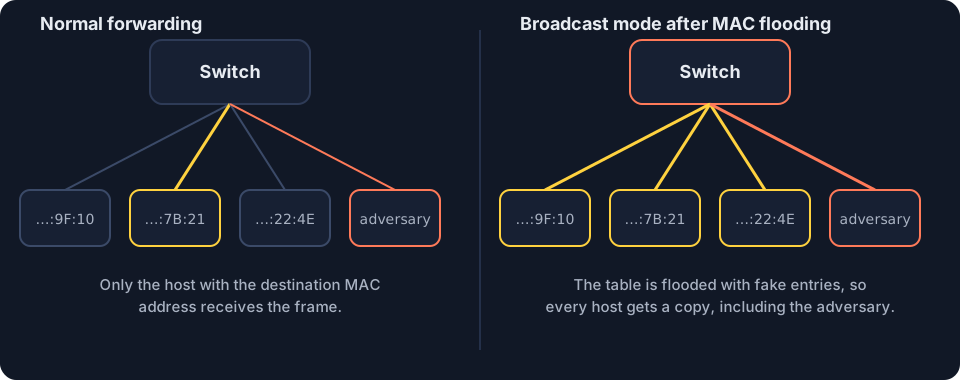
- Detect it: monitor network traffic for an unexpected surge of Ethernet frames with different MAC addresses, and check the switch’s MAC address table 3.5.E.4.
- Prevent it: port security limits the number of MAC addresses that can be used on one switch port 3.3.B.4.
Where this shows up in Unit 3
| CED | Example in Unit 3 | What you need to do |
|---|---|---|
| 3.1.B.3 | an adversary plugs a laptop into an unused data port | explain that the data port leads to a switch port and into the LAN |
| 3.1.B.6 | an adversary plugs a wireless access point into an open data port | identify a rogue access point, which bypasses the boundary firewalls |
| 3.4.C.3 | an organization with two internet connections | place a firewall at every point of ingress and egress |
| 3.4.A.2 | a stateless firewall | name the header fields it filters on |
| 3.1.A.2 | a switch receives many frames with different MAC addresses | explain MAC flooding and broadcast mode |
| 3.3.B.4 | a switch with port security enabled | explain why limiting addresses per port prevents MAC flooding |
Common mix-ups
Only devices inside the building can reach the LAN.An open network data port, or a wireless signal that reaches outside, can let an adversary in.Encryption hides everything about a packet.HTTPS encryption hides the payload. The IP addresses, ports and protocol in the headers stay readable to anyone who captures the packets.A packet and a frame are the same thing.The frame wraps the packet for one link and is replaced on the next link. The packet travels end to end.A router and a switch do the same job.A switch joins hosts within one LAN using MAC addresses. A router joins networks using IP addresses.
In 30 seconds
- A LAN is one site's network; the boundary to the internet is guarded by a router and a firewall.
- Data travels as packets (headers plus payload), each wrapped in a frame that is replaced on every link.
- A switch joins hosts inside the LAN by MAC address; a router joins networks by IP address; its LAN address is the default gateway.
- MAC flooding fills a switch's table so it broadcasts frames; port security stops it.
Session 2 Addresses: MAC, IP, ARP, DNS and ICMP
Every connected device has two addresses: a media access control (MAC) address, which names its network card on one local link, and an internet protocol (IP) address, which locates it across networks. The address resolution protocol (ARP) pairs the two inside a local area network (LAN), and the domain name system (DNS) turns names into IP addresses. Neither one checks its answers, which is exactly what ARP poisoning and DNS poisoning exploit.
MAC addresses: the name tag on a network card
A MAC address identifies a network interface card. Switches use it to deliver frames inside a LAN.
Real view
C:\> ipconfig /all
Ethernet adapter Ethernet:
  Description . . . . : Ethernet adapter
  Physical Address. . : 3C-52-82-4A-9F-10
  IPv4 Address. . . . : 192.168.1.10
Reading the physical address
Shared by many cards from this company
Different on each card
Six pairs of hexadecimal digits = 6 bytes = 48 bits. Look up the first three pairs in the public register of manufacturer prefixes and you get the company that made the card; that is how a network scanner can show "made by" next to each device.
- Format. 48 bits (6 bytes), written as six pairs of hexadecimal digits, such as
3C:52:82:4A:9F:10. Windows writes it with hyphens:3C-52-82-4A-9F-10. - Manufacturer prefix. The first three bytes, the organizationally unique identifier (OUI), identify the company that made the card. The last three bytes identify one card.
- One local link only. MAC addresses are used between two devices on the same link. A router builds a new frame, with new MAC addresses, for the next link.
- Broadcast MAC address.
FF:FF:FF:FF:FF:FFdelivers a frame to every device on the LAN.
Spoofing and filtering. Software can make a device send a MAC address other than its own: MAC spoofing. MAC filtering allows only listed MAC addresses onto a switch port or a wireless network, which prevents unauthorized devices from joining 3.2.A.2, 3.2.B.4. On the exam, enabling MAC filtering is a valid control. Beyond the CED, know that spoofing a listed address can get around it, so it works best alongside other controls. Many phones also send a random MAC address to each Wi-Fi network for privacy, a legitimate use of the same mechanism.
IP addresses and address ranges
An IP address is a numerical identifier assigned to a device’s connection by the network it joins. It usually changes when the device moves to another network; the MAC address normally stays the same.
An IPv4 address is 32 bits, written as four numbers from 0 to 255 separated by periods, such as 192.168.1.10. It has two parts:
- the network portion, shared by every device on the network (here
192.168.1), and - the host portion, different for each device (here
.10).
Like room C-14 at school: the wing letter C is the network portion and the room number 14 is the host portion.
Prefix length. In the notation 192.168.1.0/24, the number after the slash says how many bits form the network portion. A /24 fixes the first three numbers and leaves the last one free: 256 addresses, from 192.168.1.0 to 192.168.1.255, of which 254 can be given to devices. In the same way, 10.0.5.0/24 covers 10.0.5.0 to 10.0.5.255, so 10.0.5.23 and 10.0.5.1 are on the same network. A subnet mask of 255.255.255.0, as ipconfig shows it, means the same thing as /24.
Real view
C:\> ipconfig
Ethernet adapter Ethernet:
  IPv4 Address. . : 192.168.1.10
  Subnet Mask . . : 255.255.255.0
  Default Gateway : 192.168.1.1
Address and mask, lined up
Each 255 in the mask fixes that number for the whole network; the 0 is free to change. That is a /24: the first 24 bits are fixed.
The range 192.168.1.0/24, low to high
| Range | Fixed part | Addresses |
|---|---|---|
| 192.168.1.0/24 | 192.168.1 | 256 |
| 172.16.0.0/16 | 172.16 | 65,536 |
| 10.0.0.0/8 | 10 | 16,777,216 |
These rows show range sizes. The private block that starts at 172.16 is larger: 172.16.0.0/12.
- The lowest address names the network and the highest is the broadcast address: a packet sent to it reaches every device on that network. Neither is given to a device.
- Firewall rules use ranges. A rule such as “Deny inbound TCP port 23 from 10.20.30.0/24”, where TCP is the transmission control protocol, applies to every source from
10.20.30.0to10.20.30.2553.4.D.2. - Private and public addresses.
10.0.0.0/8,172.16.0.0/12and192.168.0.0/16are private: reused inside local networks and not routed on the internet. Most other addresses are public. In a log, a private source address usually means traffic from inside the organization.
ARP: from IP address to MAC address
To deliver a packet on a LAN, a device needs the receiver’s MAC address, but it usually knows only the IP address. The address resolution protocol (ARP) fills the gap.
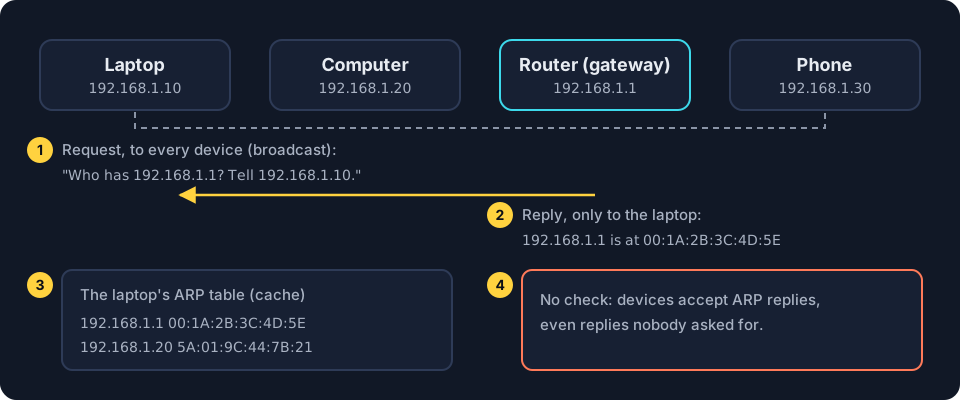
How to read this diagram
arp -a- The command (Windows, macOS or Linux) that lists a device's ARP table, the cache of IP to MAC address pairs it has learned.
Internet Address- The IP address that was looked up.
Physical Address- The matching MAC address. Windows writes it with dashes: 00-1a-2b-3c-4d-5e is 00:1A:2B:3C:4D:5E.
dynamic- Learned from an ARP reply, so it can change. A static entry is typed in by hand.
On the exam: that the request goes to every device (broadcast), the reply comes from one device, and replies are accepted without any check, which is what ARP poisoning abuses. The command output format is not tested.
- Request. The laptop broadcasts: “Who has 192.168.1.1? Tell 192.168.1.10.”
- Reply. Only the device with that IP address answers with its MAC address.
- ARP table. The laptop stores the pair in its ARP table (ARP cache) for a while. Routers keep ARP tables too.
- No check. ARP cannot verify a reply. Devices accept replies, even ones nobody asked for.
Real view
C:\> arp -a
Interface: 192.168.1.10 --- 0x7
  Internet Address      Physical Address      Type
  192.168.1.1           00-1a-2b-3c-4d-5e     dynamic
  192.168.1.20          5a-01-9c-44-7b-21     dynamic
  192.168.1.255         ff-ff-ff-ff-ff-ff     static
arp -a shows your own ARP table. "Dynamic" entries were learned from ARP replies; the broadcast address maps to the broadcast MAC address FF-FF-FF-FF-FF-FF.ARP poisoning
Because ARP accepts unrequested replies, an adversary on the LAN can send falsified ARP packets to the default gateway. The gateway’s ARP table then pairs the target’s IP address with the adversary’s MAC address, so traffic meant for the target goes to the adversary first. The falsified packets misrepresent which MAC address belongs to the target, which is why ARP poisoning goes hand in hand with MAC spoofing. The adversary copies or alters the data and passes it on, so neither side notices: an on-path attack, also called a man-in-the-middle attack 3.1.A.1.
Detection: look for one MAC address listed for two IP addresses, in ARP packets or in the default gateway’s ARP table 3.5.E.3. Try it in the simulator below.
Real view
gateway# show arp
IP address        MAC address         Interface
192.168.1.10      66:0b:5d:e2:21:ad   LAN
192.168.1.20      5a:01:9c:44:7b:21   LAN
192.168.1.66      66:0b:5d:e2:21:ad   LAN
DNS: from name to IP address
People remember names; computers connect to IP addresses. The domain name system (DNS) translates one into the other.
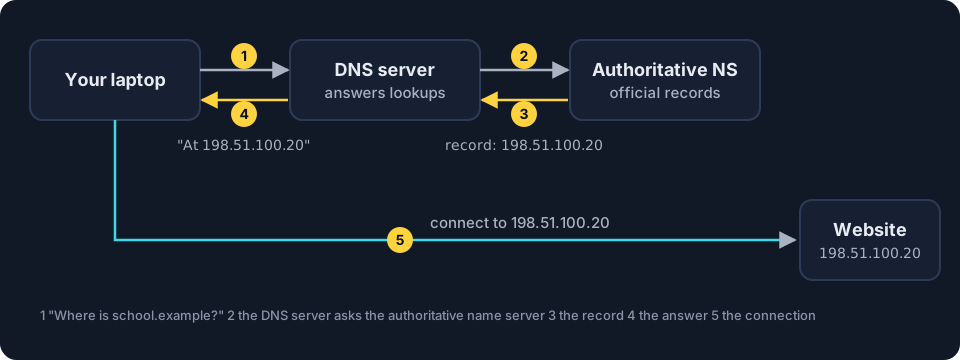
How to read this diagram
school.example.- The full domain name. The final dot marks the root of the DNS name system.
3600- Time to live in seconds: how long a DNS server may cache this record (one hour) before asking again.
IN- The record class: internet. Almost every record has it.
A- The record type: an A record maps a domain name to an IPv4 address, here 198.51.100.20.
On the exam: that DNS translates domain names to IP addresses, that DNS servers cache answers, and that a fake cached record sends users to the wrong address (DNS poisoning). The record format is not tested.
- The laptop asks its DNS server for the IP address of a domain name.
- If the DNS server does not know, it asks the authoritative name server (NS), which holds the official records for that domain.
- The name server replies with the DNS record, which pairs the name with an IP address. The DNS server caches a copy.
- The DNS server tells the laptop, and the laptop connects. It trusts the answer and cannot check it.
Real view
C:\> nslookup school.example
Server:   dns.home
Address:  192.168.1.1
Non-authoritative answer:
Name:     school.example
Address:  198.51.100.20
DNS poisoning
In DNS poisoning, an adversary pretends to be an authoritative name server and plants a fake record on a DNS server. Every user of that DNS server is sent to the adversary’s address, often a convincing copy of a login page. Users type real passwords, which the adversary collects: credential harvesting 3.1.A.3.
Detection: it is hard to see, because the site looks normal. One sign is an abrupt, unexplained drop in traffic to the organization’s real website, which should prompt a check of the DNS records 3.5.E.5.
ICMP and ping
The internet control message protocol (ICMP) carries short test and error messages between devices. The ping tool sends an ICMP echo request and waits for an echo reply. ICMP has no port numbers.
Real view
C:\> ping 192.168.1.1
Pinging 192.168.1.1 with 32 bytes of data:
Reply from 192.168.1.1: bytes=32 time=2ms
Reply from 192.168.1.1: bytes=32 time=1ms
Reply from 192.168.1.1: bytes=32 time=1ms
Reply from 192.168.1.1: bytes=32 time=2ms
- Smurf attack. The adversary sends ICMP requests to a network’s broadcast address with the victim’s address forged as the source. Every device replies to the victim, and the replies flood it: a denial of service (DoS) attack, which becomes a distributed denial of service (DDoS) attack when multiple devices attack the same target at once 3.1.A.4. The sign is a sudden increase in ICMP requests sent to a broadcast address 3.5.E.6.
- Mapping a network. Ping replies reveal which devices exist and are switched on. Unit 3 treats vulnerabilities that let adversaries gain information about systems or devices on a network as moderate risks 3.1.C.5: on their own they do not cause harm, but they help an adversary plan.
Where this shows up in Unit 3
| CED | Example in Unit 3 | What you need to do |
|---|---|---|
| 3.1.A.1 | falsified ARP packets sent to the default gateway | explain how the target’s IP address gets paired with the adversary’s MAC address |
| 3.5.E.3 | one MAC address for two IP addresses | identify the warning sign of ARP poisoning |
| 3.1.A.3 | a fake record redirects a bank’s name | explain DNS poisoning and credential harvesting |
| 3.5.E.5 | an abrupt drop in website traffic | examine the DNS records |
| 3.1.A.4, 3.5.E.6 | many ICMP requests to 192.168.1.255 | identify a smurf attack from the broadcast address |
| 3.4.D.2 | a firewall rule that names a source range such as 10.20.30.0/24 | identify the source addresses the rule covers |
Common mix-ups
A MAC address cannot be changed.Software can make a device send a different MAC address. This is MAC spoofing, and it is how MAC filtering is bypassed./24 means 24 devices./24 is the number of network bits. A /24 network holds 256 addresses.ARP works across the internet.ARP works only inside one LAN. For other networks, a device asks for the MAC address of its default gateway.DNS poisoning changes the real website.The real website is untouched. A fake DNS record sends visitors somewhere else.Ping uses a port.Ping uses ICMP, which has no port numbers.
In 30 seconds
- A MAC address names a network card on one link; an IP address locates a device across networks.
- In a /24 range the last number changes from 0 to 255; .255 is the broadcast address.
- ARP pairs IP addresses with MAC addresses and cannot check replies, so ARP poisoning puts the adversary on the path; a warning sign is one MAC address for two IP addresses.
- DNS turns names into IP addresses; DNS poisoning plants a fake record to harvest credentials; the sign is an abrupt, otherwise unexplained drop in real site traffic.
- ICMP (ping) has no ports; a smurf attack floods a victim with ICMP replies.
Session 3 Wireless basics: access points, SSIDs and beacon frames
A wireless access point connects devices to the wired local area network (LAN) by radio and announces the network's name, its service set identifier (SSID), in beacon frames several times a second. Radio does not stop at the walls, so anyone within range of the signal can see those beacon frames, listen to the traffic and try to connect.
How a wireless network is announced
A wired device must be plugged into a port inside the building. A wireless device only needs to be within range of the radio signal.
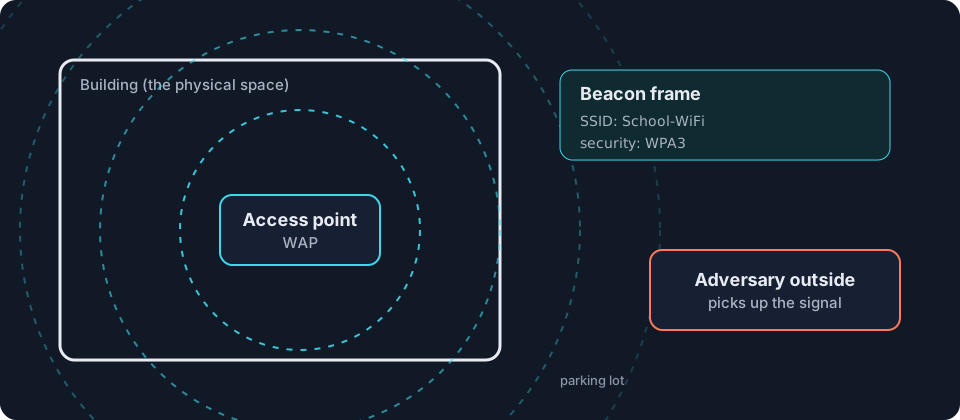
How to read this diagram
Beacon frame- A short message an access point broadcasts several times a second to announce its network.
SSID- Service set identifier: the network name people see in their Wi-Fi list.
Security: WPA3- The wireless encryption the network uses (Wi-Fi Protected Access 3).
Channel: 6- The radio channel the access point uses. You can ignore it here.
On the exam: that beacon frames announce the network and that the signal reaches beyond the building, so people outside can pick it up. The capture layout is not tested.
- The access point. A wireless access point (WAP) connects wireless devices to the wired LAN. Laptops and phones send and receive frames by radio instead of by cable.
- Beacon frames. Several times a second, the access point broadcasts a beacon frame announcing the network’s name, the service set identifier (SSID), and the wireless encryption protocols it uses. That is how a device lists the networks nearby.
- Range. Radio waves do not stop at walls. The signal can reach the parking lot or the building next door.
- Anyone in range can listen. An adversary outside can receive the beacon frames and every frame sent through the air, then try eavesdropping or try to break the encryption 3.1.B.4.
A conversation by an open window can be heard from the street.
Unit 3 calls a vulnerability a low risk when it would be difficult to exploit and would likely have minimal negative impact 3.1.C.6. The CED’s example is an access point that broadcasts beacon frames containing the SSID and the wireless encryption protocols: the information is basic and hard to turn into harm. Even so, organizations limit what their wireless signal gives away in two ways 3.2.B.1, 3.2.B.2:
- Disable beacon frame broadcasting so the network is not advertised.
- Control the broadcast direction and signal strength of each access point so the signal does not extend beyond the physical space.
Evil twins and rogue access points
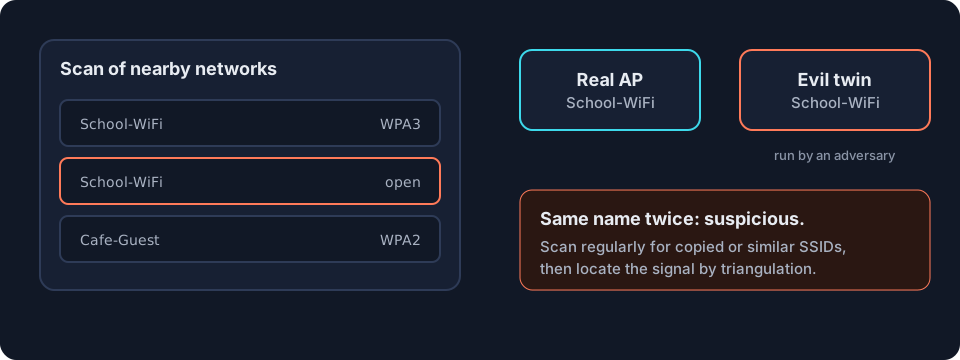
- An evil twin is an access point set up by an adversary with the same SSID as a legitimate network, or a very similar one, so users join it by mistake and send their traffic through the adversary.
- A rogue access point is an unauthorized access point plugged into an open network data port inside the building. It gives the adversary wireless access to the LAN, even from outside, and bypasses the firewalls at the boundary 3.1.B.6.
Detection 3.5.E.1. Scan regularly for SSIDs that copy or resemble the real ones. To find the device, locate the signal by triangulation: measure its strength from several places, then disable it.
Jamming
A jamming attack fills the wireless frequencies with radio noise so that devices cannot communicate: an attack on availability. Detection 3.5.E.2: no wireless device in one area can connect, and a scan of the wireless frequencies shows electromagnetic (EM) noise.
Real view
Wi-Fi
Networks
- School-WiFi🔒 WPA3
- School-WiFiopen
- Cafe-Guest🔒 WPA2
- Library-Publicopen
Try it on your own device
Open your list of Wi-Fi networks. Each name is an SSID taken from a beacon frame. Count how many networks from neighboring buildings you can see: their signals reach beyond their walls too.
Where this shows up in Unit 3
| CED | Example in Unit 3 | What you need to do |
|---|---|---|
| 3.1.B.4 | an adversary in the parking lot picks up beacon frames | explain the risk of a signal beyond the physical space |
| 3.2.B.1, 3.2.B.2 | a wireless security policy | recommend disabling beacon frame broadcasting and controlling broadcast direction and signal strength |
| 3.1.C.6 | a vulnerability that is hard to exploit and has minimal impact | rate the risk as low and justify it |
| 3.1.B.6 | an access point plugged into an unused wall port | explain how a rogue access point bypasses the boundary firewalls |
| 3.5.E.1 | a scan lists a copy of the real SSID with different security, or a look-alike name | identify a likely evil twin and locate it by triangulation |
| 3.5.E.2 | no device in one area can connect | recognize jamming and scan for EM noise |
Next in Unit 3, wireless security continues with encryption protocols and authentication in topic 3.2.
Common mix-ups
Hiding the SSID makes a network invisible.Disabling beacon frame broadcasting makes the network harder to find, not invisible. In practice the access point usually keeps beaconing with the name left blank, and devices that join still send the name, so a determined adversary can learn it.Only people inside the building can use the Wi-Fi.Anyone within range of the signal can try to connect, including someone in the parking lot.An evil twin and a rogue access point are the same thing.An evil twin imitates a legitimate network's SSID to lure users. A rogue access point is an unauthorized device plugged into the organization's own network.
In 30 seconds
- An access point announces its SSID and encryption protocols in beacon frames several times a second.
- Signals reach past the walls; disable beacon frame broadcasting and control broadcast direction and signal strength.
- An evil twin imitates a real SSID; detect it by scanning and find it by triangulation.
- A rogue access point in an open wall port bypasses the boundary firewalls; jamming is an attack on availability.
Notes done
Are you ready for Unit 3?
Ten mixed questions from all three sessions. Your result shows each session separately, so you know exactly what to review.