Topic 5.3 · Unit 5: Securing Applications and Data · 30 minute session
5.3 Protecting Stored Data with Cryptography
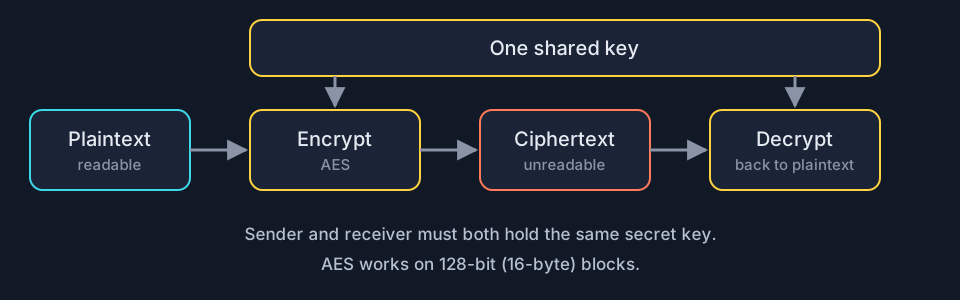
Cryptography hides information: an encryption algorithm combines plaintext with a key to make ciphertext, and decryption reverses it. The number of possible keys is the keyspace; a larger keyspace takes longer to guess. Symmetric algorithms use one key to encrypt and decrypt, asymmetric algorithms use two. Block encryption works on fixed-size chunks and stream encryption on one element at a time. The Advanced Encryption Standard (AES) is the most common symmetric algorithm: a block cipher with 128-bit blocks, used from the command line with OpenSSL.
Big idea Encryption turns readable data into noise that only the right key can undo, so a stolen file is useless without the key.
Course and exam description (CED) codes covered: 5.3.A.15.3.A.25.3.A.35.3.A.45.3.A.55.3.B.15.3.B.25.3.B.35.3.B.4
Last reviewed against the CED:
By the end of this session you can
- 5.3.A Explain how encryption can be used to protect files.
- 5.3.B Apply symmetric encryption algorithms to encrypt and decrypt data.
1. How encryption protects files (5.3.A)
The purpose of cryptography is to hide information. A cryptographic algorithm defines how to encrypt (hide) and decrypt (reverse the encryption to get the original back) 5.3.A.1. An encryption algorithm combines the information with a predefined key. The input is the plaintext; the output is the ciphertext 5.3.A.2.
The number of possible keys an algorithm can use is the keyspace. The larger the keyspace, the longer it takes an adversary to find the correct key by random chance 5.3.A.3.
| Classified by | Types |
|---|---|
| Number of keys 5.3.A.4 | Symmetric: the same key encrypts and decrypts. Asymmetric: two different keys, one to encrypt and the other to decrypt |
| How data are processed 5.3.A.5 | Block encryption: fixed-size chunks called blocks, one output block per input block. Stream encryption: continuous input, output one element at a time |
2. Symmetric encryption with AES (5.3.B)
Computer-based encryption works on binary data. The most common symmetric algorithm is the Advanced Encryption Standard, used to secure Wi-Fi transmissions, internet browsing, file encryption on disks and hardware-level encryption on processors 5.3.B.1. AES is a symmetric key block cipher that encrypts data in 128-bit blocks (16 bytes). It can use keys of different lengths; longer keys are more secure but take more time to encrypt and decrypt 5.3.B.2.
You can encrypt and decrypt from the command line with OpenSSL, with specialized software such as the open source AES Crypt, or with web-based tools 5.3.B.3. In OpenSSL the key is derived from the password you provide 5.3.B.4:
# encrypt grades.csv with AES and a 256-bit key
$ openssl enc -aes-256-cbc -e -in grades.csv -k RiverStone93 -out grades.csv.enc
# decrypt: same cipher, -d, the same password
$ openssl enc -aes-256-cbc -d -in grades.csv.enc -k RiverStone93 -out grades.csv
Build the commands with the drop-down menus, then encrypt and decrypt your own message.
Lock it in: memory hooks
One picture per idea. If you remember the hook, you can rebuild the details.
- The three wordsPlaintext in, key turns, ciphertext out.
- Symmetric vs asymmetricSymmetric: one shared key. Asymmetric: a pair of keys.
- Block vs streamBlock: chunks in, chunks out. Stream: drip in, drip out.
Common misconceptions
"AES uses a 128-bit key only."
Not quite. AES always uses 128-bit blocks, but it can use keys of different lengths. Longer keys are more secure but take more time to encrypt and decrypt.
"Symmetric means the encryption and decryption steps look the same."
Not quite. Symmetric means the same key is used to encrypt and to decrypt.
"A bigger file needs a bigger key."
Not quite. Key length decides the keyspace, not how much data can be encrypted. A block cipher simply processes more blocks.
Simulation · Symmetric encryption [5.3.A.2, 5.3.B.2, 5.3.B.4]
AES lab: one key locks and unlocks
A hospital lab encrypts a message with the Advanced Encryption Standard (AES), a symmetric block cipher: the same key encrypts and decrypts. These are real AES-128 outputs, computed when this page was built.
| Password (key source) | Ciphertext (hex) |
|---|---|
tulip-river-42 | 52bdad58fe8aecbdb785acd21f35852694af7b03d71657c6aa81e905bd785da7505979715aa3434914b46bf170927500 |
tulip-river-43 | 4185997bd28a331cf0c5434841d6bb6a5e9ef4ae00d45bfe9b38aab89c55e677a4b2d9d5dcd8a8f6fafe24c91435eccf |
Plaintext: Lab samples move to freezer B at 14:00 (38 bytes). AES works in 128-bit (16-byte) blocks, so the ciphertext is 3 blocks, 48 bytes. Changing one character of the password gives a completely different ciphertext.
Build the OpenSSL command
$ openssl enc -aes-128-cbc -e -in results.csv -k password -out results.csv.enc
-e encrypts, -d decrypts, -in is the input file, -out the output file and -k the password the key is derived from. To decrypt, use the same cipher, the same password and -d: openssl enc -aes-128-cbc -d -in results.csv.enc -k password -out results.csv
Try it yourself
Ciphertext (hex)Press Encrypt
ResultEncrypt first
Exam traps
- Keyspace is the number of possible keys, not the key length. More bits in the key means a larger keyspace.
- In the OpenSSL commands, -e encrypts and -d decrypts; the key is derived from the password given after -k.
- AES is a symmetric block cipher: 128-bit (16-byte) blocks, same key both ways.
By the numbers
Say each list out loud, then tap to check.
2 key classifications Say them, then tap
- symmetric (one key)
- asymmetric (two keys)
2 processing classifications Say them, then tap
AES block size Say them, then tap
- 128 bits
- which is 16 bytes
3 ways to encrypt Say them, then tap
- command line (OpenSSL)
- specialized software (AES Crypt)
- web-based tools
In 30 seconds
- Encryption hides information; decryption reverses it. Plaintext plus key gives ciphertext.
- Keyspace is the number of possible keys; larger means slower to guess by chance.
- Symmetric uses one key, asymmetric two. Block works in fixed-size chunks, stream continuously.
- AES secures Wi-Fi, web browsing, disk encryption and processor-level encryption; it is a block cipher with 128-bit blocks and keys of varying lengths.
- openssl enc -aes-128-cbc -e encrypts a file; the same command with -d and the same password decrypts it.
Cover this list, say the points out loud, then take the checkpoint without scrolling back up.
Checkpoint · 8 questions
Checkpoint: Protecting Stored Data with Cryptography
Pick an answer to mark it. Every answer is explained, and you can try any question again. Your saved score counts first tries only, and stays in this browser.
-
A locker system is changing its digital lock codes.
Lock systems System Key length Possible keys A 16 bits 65,536 B 32 bits 4,294,967,296 -
Two coworkers agree on one secret password in person. One encrypts a spreadsheet with it; the other decrypts the spreadsheet with the same password.
-
A project manager encrypted a file with this command.
bash history Command openssl enc -aes-128-cbc -e -in plan.txt -k Harbor55 -out plan.enc
Key terms: flip the cards
Read the term, say the definition out loud, then flip to check. Struggling a little to remember is what makes it stick.
-
Cryptographytap to flip
The practice of hiding information with algorithms that encrypt (hide) and decrypt (recover) it.
Example and CED codes -
Plaintexttap to flip
The readable information that goes into an encryption algorithm.
Example and CED codes -
Ciphertexttap to flip
The unreadable output of an encryption algorithm; only the right key turns it back into plaintext.
Example and CED codes -
Keyspacetap to flip
The number of possible keys an encryption algorithm can use; an n-bit key has a keyspace of 2^n.
Example and CED codes -
Symmetric encryptiontap to flip
Encryption that uses the same key to encrypt and decrypt information.
Example and CED codes -
Asymmetric encryptiontap to flip
Encryption that uses two different keys, one to encrypt and the other to decrypt.
Example and CED codes -
Block encryptiontap to flip
Encryption that handles information in fixed-size chunks called blocks, producing an output block for each input block.
Example and CED codes -
Stream encryptiontap to flip
Encryption that handles input continuously, producing output one element at a time.
Example and CED codes -
Advanced Encryption Standard (AES)tap to flip
The most common symmetric encryption algorithm: a block cipher using 128-bit (16-byte) blocks and keys of varying lengths.
Example and CED codes -
OpenSSLtap to flip
A command line tool for encrypting and decrypting with symmetric (openssl enc) and asymmetric (openssl genrsa, pkeyutl) algorithms.
Example and CED codes -
Data at resttap to flip
Data stored on a drive; protect the physical drive from destruction or theft and encrypt the data so a thief cannot immediately read them.
Example and CED codes
Questions students ask
What is a keyspace?
The number of possible keys an encryption algorithm can use. The larger the keyspace, the longer it takes an adversary to find the correct key by random chance.
Is AES symmetric or asymmetric?
Symmetric. The same key encrypts and decrypts. It is also a block cipher that works on 128-bit blocks.
How do you decrypt a file encrypted with OpenSSL AES?
Run openssl enc with the same cipher (for example -aes-128-cbc), -d instead of -e, the encrypted file after -in, the same password after -k and an output file after -out.