Topic 3.1 · Unit 3: Securing Networks · 35 minute session
3.1 Network Vulnerabilities and Attacks
Topic 3.1 covers four common network attacks: address resolution protocol (ARP) poisoning, media access control (MAC) flooding, domain name system (DNS) poisoning and smurf attacks. It explains the network weaknesses adversaries exploit, from open data ports to weak wireless encryption, and how to rate each risk as high, moderate or low by its likelihood and impact.
Course and exam description (CED) codes covered: 3.1.A.13.1.A.23.1.A.33.1.A.43.1.B.13.1.B.23.1.B.33.1.B.43.1.B.53.1.B.63.1.B.73.1.C.13.1.C.23.1.C.33.1.C.43.1.C.53.1.C.6
Last reviewed against the CED:
By the end of this session you can
- 3.1.A Identify common network attacks.
- 3.1.B Explain how adversaries can exploit network vulnerabilities to steal, disrupt, or destroy network communication.
- 3.1.C Assess and document risks from network vulnerabilities.
New to switches, MAC addresses or DNS? Do the Before Unit 3: Networking Basics side quest first. This topic assumes it.
1. Four common network attacks (3.1.A)
| Attack | What the adversary does | What it is an example of |
|---|---|---|
| ARP poisoning | sends falsified ARP packets so the default gateway pairs the target’s internet protocol (IP) address with the adversary’s MAC address | an on-path attack, using MAC spoofing |
| MAC flooding | sends a switch a flood of Ethernet frames, each with a different MAC address | eavesdropping (sniffing) |
| DNS poisoning | poses as an authoritative name server and plants a fake DNS record | credential harvesting |
| Smurf attack | sends many Internet Control Message Protocol (ICMP) requests, carrying the victim’s address, to a network’s broadcast address | denial of service (DoS) |
ARP poisoning: getting on the path [3.1.A.1]
The default gateway uses ARP to build a table that pairs IP addresses with MAC addresses. In ARP poisoning, the adversary sends the gateway falsified ARP packets so that the target’s IP address is linked to the adversary’s MAC address. Traffic meant for the target now reaches the adversary first. Faking a MAC address like this is MAC spoofing.
This makes ARP poisoning an on-path attack, also called a man-in-the-middle attack. The adversary sits in the data stream between two parties, captures what each sends, and may copy or alter it before passing it on. Both parties believe they are talking directly to each other. Run the ARP poisoning simulator to see the gateway’s table change.
MAC flooding: making a switch broadcast [3.1.A.2]
A switch normally sends each frame only to the port where the destination MAC address lives. In MAC flooding, the adversary sends the switch many Ethernet frames, each with a different MAC address. This can force the switch into broadcast mode, so it sends frames out of every port, and the adversary collects frames meant for other devices. Capturing data in transit to record and copy it is eavesdropping, also called sniffing. Try it in the simulator below.
DNS poisoning: sending users to a fake site [3.1.A.3]
In DNS poisoning, the adversary pretends to be an authoritative name server (NS) and plants a fake DNS record on a DNS server. Browsers that ask that server are redirected to a malicious website built to look like the real login page. Users type their real usernames and passwords, and the adversary captures them. Setting up a fake login site to collect real credentials is credential harvesting.
Smurf attacks: turning a network against a victim [3.1.A.4]
A smurf attack tries to overwhelm a network with ICMP requests. The adversary sends many requests with the victim’s address as the source to the network’s broadcast address. The gateway passes each request to every device on the network, and every device replies to the victim. The flood of replies can block legitimate messages.
- A denial of service (DoS) attack makes a system or resource unavailable to authorized users. A smurf attack is one kind.
- When many devices attack the same target at the same time, it is a distributed denial of service (DDoS) attack.
2. How adversaries exploit network weaknesses (3.1.B)
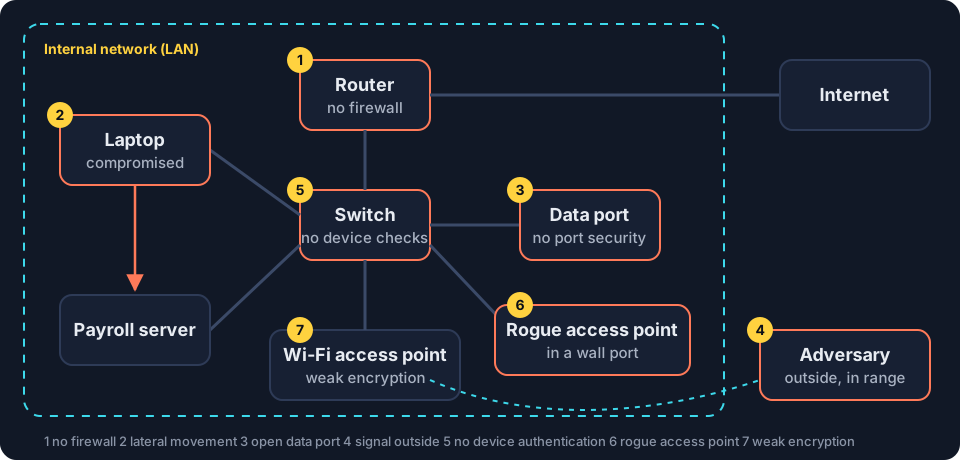
- No firewall, or a badly configured one [3.1.B.1]. Adversaries can send malicious traffic into the network to flood it (a DoS), to map its internal structure, or to spoof a legitimate device.
- One compromised device [3.1.B.2]. Once adversaries control one device, they often use that access to compromise other devices on the same local area network (LAN). This is lateral movement.
- An open data port [3.1.B.3]. A wall data port leads straight to a switch port. Unless the switch limits which devices each port accepts (port security), anyone who plugs in is on the LAN, ready to launch DoS, MAC flooding or MAC spoofing attacks.
- A signal that leaves the building [3.1.B.4]. Standing outside a secure space, an adversary can pick up the wireless access point’s signal and beacon frames, learn about the wireless network, and attempt eavesdropping and cryptographic attacks.
- A network that does not check who joins [3.1.B.5]. Attacking from inside is easier than attacking from outside, so adversaries try to join the network. If the network never asks a device or user to prove who they are, joining is easy.
- A rogue access point [3.1.B.6]. An adversary plugs a wireless access point into an open network port. The rogue access point gives wireless access to the LAN, possibly from outside the building, and bypasses the firewalls.
- Weak wireless encryption [3.1.B.7]. Adversaries can try to break wireless encryption, then intercept, steal or compromise data on the network. Topic 3.2 covers strong encryption.
3. Assessing and documenting network risks (3.1.C)
What is at stake [3.1.C.1]. Network vulnerabilities can let adversaries intercept and alter data in transit, launch DoS attacks, or move laterally to more sensitive or critical systems. Each of these threatens confidentiality, integrity or availability.
| What the adversary can do | Main goal of security put at risk |
|---|---|
| intercept data in transit | confidentiality |
| alter data in transit | integrity |
| launch a DoS attack | availability |
| move laterally to critical systems | any of the three, depending on what those systems hold |
Finding vulnerabilities [3.1.C.2]. Automated vulnerability scanners check networks, devices and applications for known vulnerabilities. Their reports usually list each vulnerability found, its severity, and how to mitigate it.
Likelihood [3.1.C.3]. Exploiting many network vulnerabilities takes advanced technical ability and knowledge. The harder an exploit is, the lower its likelihood.
Rating the risk [3.1.C.4 to 3.1.C.6]
| Rating | What it means | Example (original) |
|---|---|---|
| High | an adversary can easily cause significant harm: capture traffic, spoof a legitimate device, or launch a DoS attack | a public library lobby has live data ports with no port security, so anyone can plug in, capture traffic or pose as a staff computer |
| Moderate | an adversary could gain information about the systems or devices on the network | the network answers unauthenticated scans with a list of device names and operating system versions |
| Low | hard to exploit, and likely to have little negative impact | a printer’s settings page, reachable only from a locked server room, runs an old version with a flaw that needs rare expertise to use |
When you document a risk, state the vulnerability, how likely it is to be exploited (and why), what the impact would be, and the rating that follows.
Where this shows up next
- Protecting networks with policies and wireless security: topic 3.2.
- Segmentation, which limits lateral movement: topic 3.3.
- Firewalls at every point of ingress and egress: topic 3.4.
- Detecting each attack in this topic: topic 3.5.
Lock it in: memory hooks
One picture per idea. If you remember the hook, you can rebuild the details.
- ARP poisoningA forged change of address: the gateway's ARP table is told the target "moved" to the adversary's MAC, so its traffic gets delivered there first.
- MAC floodingFlood the table, flood the ports: once the switch's table overflows, it shouts every frame to everyone, adversary included.
- DNS poisoningA poisoned phone book: right name, wrong number. The real site is fine; the directory is lying.
- Smurf attackSmurfs come in crowds: one forged request to the broadcast address, a crowd of replies to the victim.
- RiskRisk needs both halves: likelihood times impact. A devastating attack that almost nobody can pull off is lower risk than it looks.
Common misconceptions
"MAC flooding takes the switch offline, so it is a denial of service."
Not quite. The goal of MAC flooding is eavesdropping. The switch keeps working but broadcasts frames out of every port, so the adversary collects traffic meant for others.
"DNS poisoning hacks the real website."
Not quite. The real website is untouched. A fake record on a DNS server sends users to the adversary's copy, where their credentials are harvested.
"In a smurf attack, the adversary's own computer floods the victim."
Not quite. The adversary sends requests to a network's broadcast address with the victim's address forged as the source. The other devices on that network do the flooding by replying to the victim.
"A vulnerability that would cause huge damage is always high risk."
Not quite. Risk combines likelihood and impact. If exploiting it needs rare skill or knowledge, the likelihood is lower, and so is the risk.
Simulation · MAC flooding [3.1.A.2, 3.5.E.4, 3.3.B.4]
Simulator: flood a switch's MAC address table
The switch's table holds only 8 entries in this model. Real switches hold thousands, but the idea is the same.
MAC address table 3 / 8
- port 1
3C:52:82:4A:9F:10 - port 2
5A:01:9C:44:7B:21 - port 3
0C:9D:92:1A:22:4E
Ready. Step 1 sends a frame from the laptop to the file server.
Read the steps without the simulator
- Normal forwarding. The laptop sends a frame to the file server's MAC address. The switch looks it up in its MAC address table and sends the frame only out of port 2.
- The flood. The adversary on port 4 sends a stream of Ethernet frames, each with a different fake source MAC address. The switch tries to learn every one, and the table fills up.
- Broadcast mode. Real entries age out of the full table and the switch has no room to relearn them. Frames for addresses it no longer knows go out of every port, so the laptop's next frame to the server also reaches the adversary, who can now eavesdrop.
- Detect and prevent. Defenders spot an unexpected surge of frames with different MAC addresses, and a table full of unfamiliar entries [3.5.E.4]. Port security limits how many MAC addresses one port may use, so the flood from port 4 is blocked [3.3.B.4].
Simulation · DNS poisoning [3.1.A.3, 3.5.E.5]
Simulator: poison a DNS server's records
A student looks up bank.example. Watch what changes when an adversary plants a fake record, then switch sides and find it.
DNS server cache
| Name | IP address |
|---|---|
| bank.example | 198.51.100.20 |
Source: the authoritative name server
Student's browser
bank.example
Not loaded yet.
Real website visits per hour
Ready. Step 1 looks up bank.example normally.
Read the steps without the simulator
- Normal lookup. The DNS server's record says bank.example is at 198.51.100.20, the real bank. The student's browser connects there.
- The attack. The adversary pretends to be the authoritative name server and plants a fake record on the DNS server: bank.example is at 203.0.113.66.
- Credential harvesting. Every user of that DNS server now reaches the adversary's copy of the login page. The real site is untouched, but the usernames and passwords typed into the copy go to the adversary.
- Detection. Users see nothing unusual, so DNS poisoning is hard to detect. The sign is an abrupt, unexplained drop in visits to the real website. Defenders then examine the DNS records and find the fake one [3.5.E.5].
In 30 seconds
- ARP poisoning (on-path, MAC spoofing), MAC flooding (eavesdropping), DNS poisoning (credential harvesting) and smurf attacks (DoS) are the four attacks to know.
- Weak points: no firewall, lateral movement, open data ports, signals outside, no device authentication, rogue access points, weak wireless encryption.
- Network vulnerabilities threaten confidentiality (interception), integrity (alteration) and availability (DoS).
- High risk: easy and serious. Moderate: reveals information about systems. Low: hard to exploit, little impact.
Cover this list, say the points out loud, then take the checkpoint without scrolling back up.
Checkpoint · 10 questions
Checkpoint: 3.1 Network Vulnerabilities and Attacks
Pick an answer to mark it. Every answer is explained. Your score stays in this browser only.
Key terms: flip the cards
Read the term, say the definition out loud, then flip to check. Struggling a little to remember is what makes it stick.
-
ARP poisoningtap to flip
Sending falsified address resolution protocol (ARP) packets so a device's ARP table pairs the target's internet protocol (IP) address with the adversary's media access control (MAC) address.
Example and CED codes -
MAC spoofingtap to flip
Making a device send a media access control (MAC) address other than its own.
Example and CED codes -
On-path attacktap to flip
An attack in which the adversary secretly sits between two parties, capturing and possibly altering the data they exchange.
Example and CED codes -
MAC floodingtap to flip
Sending a switch many frames with different fake media access control (MAC) addresses so its table fills and it broadcasts frames out of every port.
Example and CED codes -
Eavesdroppingtap to flip
Capturing data in transit in order to read, record or copy it.
Example and CED codes -
DNS poisoningtap to flip
Planting a fake domain name system (DNS) record on a DNS server so users are redirected, typically to a malicious website.
Example and CED codes -
Credential harvestingtap to flip
Collecting real usernames and passwords through a fake login site.
Example and CED codes -
Smurf attacktap to flip
A denial-of-service attack: internet control message protocol (ICMP) requests sent to a broadcast address with the victim's address forged as the source, so all replies flood the victim.
Example and CED codes -
Denial of service (DoS)tap to flip
An attack that makes a system or resource unavailable to authorized users.
Example and CED codes -
Distributed denial of service (DDoS)tap to flip
A denial of service attack in which many devices attack the same target at the same time.
Example and CED codes -
Lateral movementtap to flip
Using access to one compromised device to compromise other devices on the same local area network (LAN).
Example and CED codes -
Rogue access pointtap to flip
An unauthorized wireless access point connected to an organization's network, often through an open data port.
Example and CED codes -
Vulnerability scannertap to flip
An automated tool that checks networks, devices and applications for known vulnerabilities and reports what it finds.
Example and CED codes
Questions students ask
What are the four network attacks in AP® Cybersecurity topic 3.1?
ARP poisoning (an on-path attack that uses MAC spoofing), MAC flooding (eavesdropping on a switch forced into broadcast mode), DNS poisoning (credential harvesting through a fake DNS record) and smurf attacks (a denial of service using ICMP requests sent to a broadcast address).
What is the difference between DoS and DDoS?
A denial of service (DoS) attack makes a system or resource unavailable to authorized users. When many devices attack the same target at the same time, it is a distributed denial of service (DDoS) attack.
How do you decide if a network vulnerability is high, moderate or low risk?
Weigh likelihood and impact. High risks let an adversary easily cause significant harm, such as capturing traffic, spoofing a device or launching a DoS attack. Moderate risks mainly let an adversary learn about systems on the network. Low risks are hard to exploit and would have little impact.
What does a vulnerability scanner do?
An automated vulnerability scanner checks networks, devices and applications for known vulnerabilities, then produces a report that usually lists what it found, how severe each issue is, and how to fix it.